Control surfaces: hardware reference
The physical desks on the bench, and Mackie Control as it travels on the wire. A desk here drives ControlModule's encoders, faders and switches, which were laid out to match this class of hardware. How to connect one: Connecting a control surface.
None of these desks speaks OSC. The X-Touch and the QCon are Mackie Control surfaces over MIDI, which MoonLight reads through its MIDI service. The APC40 mkII has a MIDI layout of its own.
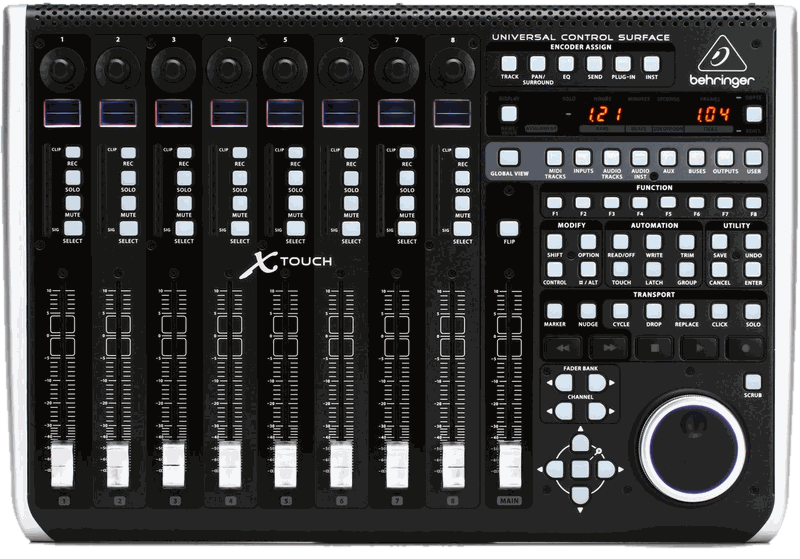
Behringer X-Touch (Universal)
The larger of the Mackie desks, and the only desk here with a network port.
Sources: product page · Ardour's notes on Behringer in MCU mode
| Faders | 9 x 100 mm touch-sensitive motorized (8 channel + 1 master) |
| Encoders | 8 rotary push-encoders with LED rings |
| Display | LCD scribble strips per channel |
| Protocols | Mackie Control (MCU), HUI, plain MIDI |
| Connectivity | USB-B (MIDI), 5-pin DIN MIDI in/out, RJ45 Ethernet for RTP-MIDI |
| Not supported | OSC |
The Ethernet port carries RTP-MIDI, not OSC. RTP-MIDI (RFC 6295, UDP port 5004) is MIDI tunneled over a network with a session layer: an invitation handshake and clock synchronization.
The protocol's recovery journal is optional, and MoonLight sends none, so a packet lost on the wire stays lost.
It is what the MIDI service's network source speaks.
A desk that waits to be invited goes in host; for a desk that invites the device, host stays empty.
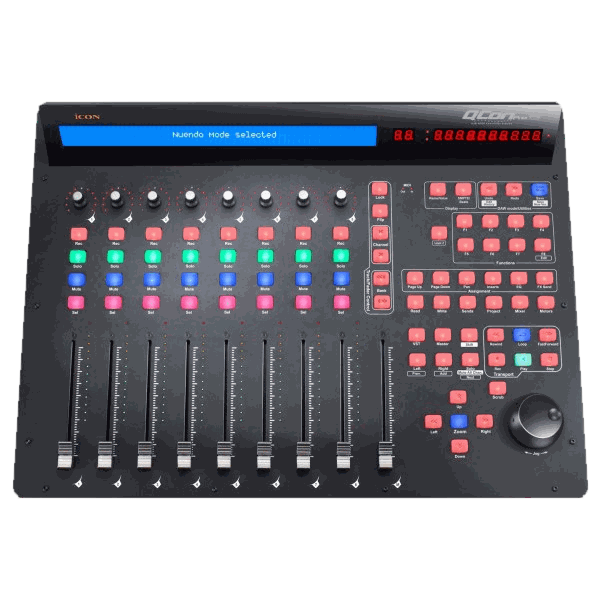
iCON QCon Pro G2
Sources: product page · user manual (PDF)
| Faders | 9 x touch-sensitive motorized (8 channel + 1 master) |
| Encoders | 8 push-encoders with 11-segment LED rings |
| Display | backlit LCD, 12-segment LED level meter per channel |
| Buttons | 78, plus a jog/shuttle wheel and 2 foot-pedal inputs |
| Protocols | Mackie Control (MCU), HUI |
| Connectivity | USB 2.0 only (class-compliant) |
| Not supported | OSC, Ethernet |
No network port at all. It reaches MoonLight through a computer's USB port and the browser, or straight through a board's own USB port with the MIDI service's source set to USB.
A device with the MIDI service's share on puts it on the network.
It brings its own power adapter, so a board's port needs to supply no 5 V for it.
What Mackie Control looks like on the wire
MCU is ordinary MIDI carrying agreed meanings, so a parser is small; the work is in the semantics and the feedback, not the bytes.
| element | encoding |
|---|---|
| Fader position | pitch bend, one MIDI channel per fader (channels 0-8 for faders 1-9). 14-bit, which is why a motorized desk feels smooth where a 7-bit CC would step |
| Fader touch | note on/off, notes 0x68 (104) to 0x70 (112), so the desk says when a hand is on a fader |
| Encoders | control change, relative (a turn sends a delta, not a position) |
| Encoder LED rings | control change back to the desk; the value's mode field picks dot / boost-cut / wrap / spread |
| Buttons and LEDs | note on/off, the same note number in both directions |
| Scribble strips | SysEx, 0x12 after the header, then the text |
It is bidirectional by nature, and that is the point of the hardware. The motors move only because the host sends fader positions back, and the scribble strips show only what the host writes. MoonLight's MIDI service sends the positions, the button lights and the rings, so a preset change moves the faders.
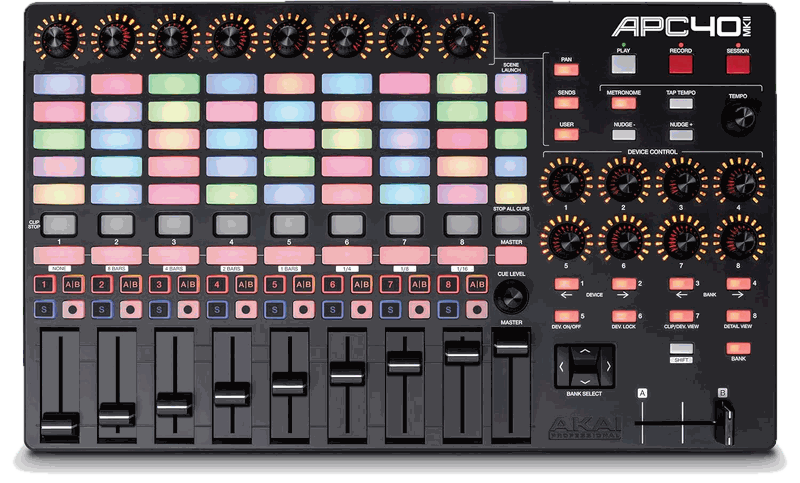
Akai APC40 mkII
A clip launcher built for Ableton Live: a grid of RGB pads above a row of eight channel strips, and no motors.
Sources: product page · communications protocol v1.2 (PDF), the reference for every number below
| Faders | 9 x 45 mm, not motorized (8 track + 1 master), plus a crossfader |
| Knobs | 8 track knobs and 8 device knobs, each with a 15-segment LED ring; a tempo and a cue knob without rings |
| Pads | 40 RGB clip-launch pads (8 wide, 5 high) and 5 RGB scene-launch pads |
| Buttons per track | clip stop, track select, activator (numbered 1-8), crossfader A/B, solo, record arm |
| Other buttons | transport (play, record, session record), navigation (up, down, left, right, bank), shift, tap tempo, nudge, device and bank controls |
| Protocols | its own MIDI layout; not Mackie Control |
| Connectivity | USB only (class-compliant MIDI, bus-powered), one MIDI port, a footswitch input |
| Not supported | OSC, Ethernet, Mackie Control |
Three modes
The host picks the mode with a SysEx message: F0 47 7F 29 60 00 04 <mode> <version high> <version low> <bugfix> F7.
The APC40 starts in Generic mode on every power-up.
| mode | byte | buttons | lights | knobs |
|---|---|---|---|---|
| Generic | 0x40 |
activator, solo and record arm toggle themselves; track select sends nothing | the APC40 runs them | the device knobs follow the selected track |
| Ableton Live | 0x41 |
momentary | the host, except the knob rings | not banked |
| Alternate Ableton Live | 0x42 |
momentary | all of them the host's | not banked |
Alternate Ableton Live mode suits a host that owns the state, as MoonLight's control surface does. Every press only reports and every light shows what the host sends, so a value changed elsewhere never leaves a light out of step. A browser needs the user's permission to send SysEx.
On the wire
| control | message | channel | number | value |
|---|---|---|---|---|
| Track fader 1-8 | control change | track 1-8 = 0-7 | 7 | 0-127, absolute |
| Master fader | control change | 0 | 14 | 0-127 |
| Crossfader | control change | 0 | 15 | 0-127 |
| Device knob 1-8 | control change | 0 (banked per track in Generic mode) | 16-23 | 0-127, absolute |
| Track knob 1-8 | control change | 0 | 48-55 | 0-127, absolute |
| Tempo, cue level | control change | 0 | 13, 47 | relative: 1-63 up, 127 down to 64 |
| Footswitch | control change | 0 | 64 | 127 pressed, 0 released |
| Clip launch 1-40 | note | 0 | 0-39, bottom-left first | press 127, release note off |
| Record arm, solo, activator, track select, clip stop | note | track 1-8 = 0-7 | 48, 49, 50, 51, 52 | press 127 |
| Crossfader A/B | note | track 1-8 = 0-7 | 66 | press 127 |
| Scene launch 1-5 | note | 0 | 82-86 | press 127 |
| Device and bank controls | note | 0 | 58-65 | press 127 |
| Master, stop all clips | note | 0 | 80, 81 | press 127 |
| Pan, sends, user, metronome | note | 0 | 87-90 | press 127 |
| Play, stop, record | note | 0 | 91, 92, 93 | press 127 |
| Up, down, right, left | note | 0 | 94, 95, 96, 97 | press 127 |
| Shift, tap tempo, nudge -, nudge + | note | 0 | 98, 99, 100, 101 | press 127 |
| Session record, bank lock | note | 0 | 102, 103 | press 127 |
The clip pads count from the bottom-left: notes 0-7 are the bottom row and 32-39 the top row, left to right. The protocol does not say so; it was measured on the device. A release arrives as a note off.
The way back
A light takes the same number its control sends, in the other direction.
- A one-color light (activator, solo, record arm, track select and the rest): a note on with velocity 1-127 lights it, velocity 0 or a note off clears it. Clip stop also blinks at velocity 2, in step with the tempo; crossfader A/B shows yellow at 1 and orange at 2-127.
- An RGB pad (clip launch and scene launch): the velocity picks one of 128 colors from Akai's palette, 0 being off. The channel picks how it shows: 0 is steady, 1-5 a one-shot, 6-10 pulsing and 11-15 blinking. Each of the last three runs at a rate from 1/24 to 1/2 of the tempo.
- A knob ring: the knob's own control change, 0-127, sets its position. The ring style is a second control change, 56-63 for the track knobs and 24-31 for the device knobs. Its value 0 is off, 1 a single light, 2 fills like a volume meter and 3 fills out from the center like a pan control.
Where it fits MoonLight
The Control surface has eight faders, eight encoders, eight switches and a grid of preset pads. The APC40 has a control for each:
| APC40 | Control surface |
|---|---|
| Track faders 1-8 | fader1 to fader8 |
| Track knobs 1-8, with their rings | encoder1 to encoder8 |
| Activator buttons 1-8, with their lights | switch1 to switch8 |
| Clip pads 1-40, with their colors | the first 40 preset pads |