Home automation
Bring a MoonLight device into your smart home, or have it drive your smart lights: the steps are the Bring the device into a smart home process, and the reference behind them follows: the MQTT topics, the Homebridge accessory, presets in Home Assistant, the infrastructure setup and troubleshooting. The device uses the MQTT module (or, for some hubs, the built-in WLED compatibility). It exposes on/off, brightness, and color; a platform adopts it and drives those from its own app, voice assistant, and automations.
Integration goes both directions:
- Your smart home controlling the device: a hub such as Home Assistant or Homebridge drives its on/off, brightness and color from the hub's app and automations.
- The device controlling smart-home lights: MoonLight drives Philips Hue bulbs as effect pixels, so your existing smart bulbs become part of a show.
The process assumes the hub and (where relevant) an MQTT broker are already running. If any of that infrastructure isn't there yet, follow Set up a smart-home hub for HA-with-Mosquitto and standalone-Homebridge, then come back. The facts behind it are under Set up the infrastructure at the end.
- Adopt in Home Assistant: HA discovers the device, or auto-creates the entity from HA's broker. Optionally bridge that entity into Apple Home via HA's HomeKit Bridge.
- Adopt in Homebridge: standalone Apple-Home-only path when HA isn't wanted: add one
mqttthingaccessory, pair in Home. - Drive Hue lights: point an effect at your Hue bulbs.
- Other platforms: Node-RED, openHAB, and other MQTT hubs reach the device through the same topics.
The control surface these integrations drive is documented once: the MQTT controls on the MQTT module's card, and the topics and accessory config in The MQTT topics below. The effect list Home Assistant shows is Presets in Home Assistant.
Prerequisites
- A MoonLight device on your WiFi/Ethernet. The MQTT paths (HA MQTT discovery, Homebridge) need the MQTT module, which ships on boards whose catalog entry includes it, the Shelly model among them. The WLED-only HA path needs none: HA reaches the device over its always-present
/jsonendpoint. - The device's MAC suffix: the last 6 hex digits of its MAC, its stable MQTT topic id (
MoonLight/<suffix>), which also identifies it to HA on the WLED path. Read it from the MQTT module'smqtt_status, or once the device is talking to the broker,mosquitto_sub -t 'MoonLight/#'. The examples below use563cfe; substitute yours. - A running hub, with what each path needs:
- HA + Mosquitto broker add-on: for MQTT auto-discovery (richer state + HomeKit Bridge). Set up HA + Mosquitto.
- HA alone (no broker): for the WLED-integration path. The same HA install, without the Mosquitto add-on.
- Homebridge + a Mosquitto broker: for the standalone Apple-Home-only path. Set up standalone Homebridge + Mosquitto.
Adopt in Home Assistant
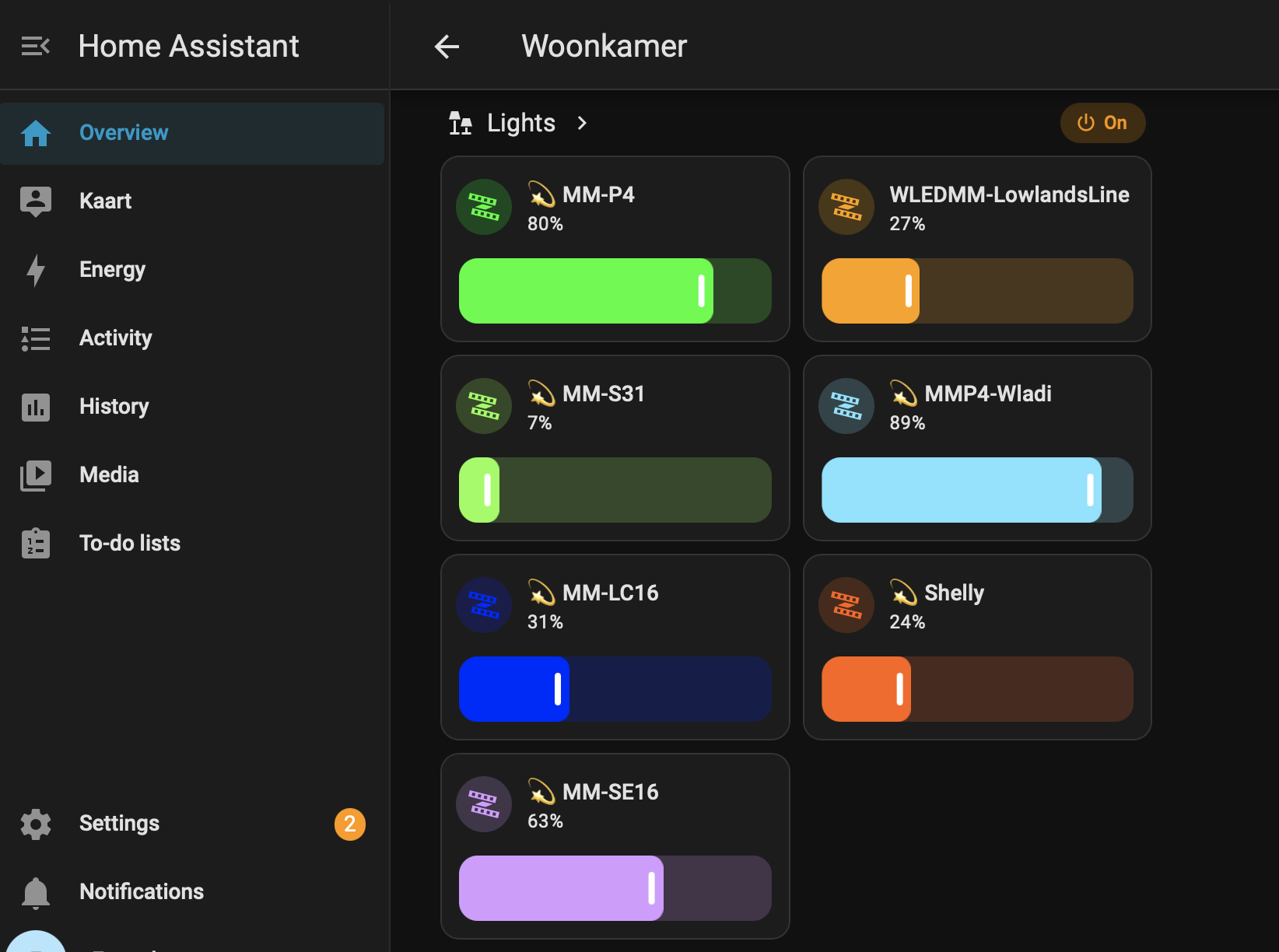
HA discovers a MoonLight device automatically over the WLED path, with no broker and nothing to configure, and lists it as a light with color, palette, and brightness. The 💫 in each name marks it as MoonLight among any plain WLED devices. An optional step brings that entity into Apple Home via HA's own HomeKit Bridge: no Homebridge needed. Turn the haDiscovery control on only for the MQTT path (broker-only or cross-subnet setups); see How HA creates the entity below.
The chain:
Apple Home ──HAP──▶ HA (HomeKit Bridge) ──MQTT──▶ Mosquitto ◀──MQTT── MoonLight device
                             └── HA app / voice / automations
How HA creates the entity
Nothing to configure: HA discovers the device automatically over the WLED path. Two paths exist; the WLED one is the default and the richer of the two, so a device appears in HA once out of the box:
- WLED integration, the default and recommended path: HA finds the device over zeroconf and reads its WLED-compatible
/jsonAPI, with color, palette, brightness and diagnostic sensors and no broker. - MQTT auto-discovery (opt-in, uses the Mosquitto add-on): turn
haDiscoveryon for a broker-only or cross-subnet setup where zeroconf can't reach HA. The device announces itself on the retainedhomeassistant/light/…/configtopic, and HA auto-creates a light entity with on/off and brightness. The discovery config declares no color. It grays out when the device drops offline. Color/palette control stays on the separatehsv/settopic: not the auto-created entity.
Why is MQTT discovery off by default? Because the WLED path alone already gives HA a richer light (color, palette, sensors) with zero infrastructure, and running both lists the device twice (one WLED entity, one MQTT entity). So WLED is the default and MQTT discovery is opt-in, reserved for what WLED's zeroconf can't do: reach across VLANs/guest nets or a broker-only network, sit next to other MQTT devices (Tasmota, ESPHome, Zigbee2MQTT) under one convention, or push state with retained-across-offline latency. On a flat LAN with only MoonLight devices, WLED alone is the whole story; a segmented network or an existing MQTT estate is where turning haDiscovery on earns its slot. The two never announce the same device to the same hub by default, so HA never double-lists it, and toggling haDiscovery re-announces or retracts live: an empty retained config removes the MQTT entity, with no reconnect. A device that wants both cards can still have them, deliberately.
The MQTT control surface (topics, HSV → palette mapping, retained state) is in The MQTT topics below.
Not this: do not hand-configure HA's generic MQTT light against homeassistant/light/<slug>/…: that's HA's own discovery topic schema, not a control API. The device answers via the auto-discovery above.
Apple Home through HA
HA can act as its own HomeKit bridge, so the light reaches Apple Home driven end-to-end through HA: same outcome as the standalone Homebridge recipe, one fewer service to run.
Adopt in Homebridge
Standalone Apple-Home-only path, for when HA isn't wanted. It assumes Homebridge and a Mosquitto broker are running, usually together on a Pi; a Mac or PC works for a test. Set up standalone Homebridge + Mosquitto covers installing them. Find the broker's LAN IP with hostname -I (Pi/Linux), ipconfig getifaddr en0 (macOS), or ipconfig (Windows). The accessory is in The Homebridge accessory.
Drive Hue lights
The other direction: instead of a hub controlling the device, the device controls your Philips Hue bulbs, treating each color bulb as a pixel of an effect. Your existing smart lights join the show, an effect's colors glide across them alongside (or instead of) an LED strip. It is a MoonLight output driver rather than a hub integration: the device talks straight to the Hue bridge over its LAN HTTP API, with no broker.
Because Hue is a rate-limited HTTP hub (~10 commands/s), this is smooth ambient color, not fast strobing: the driver paces itself to the bridge and lets it fade between colors. Full behavior, controls, and the wire contract are in the driver reference: Drivers › Hue.
Recommended layout: set up a one-dimensional grid: width 1, height = the number of Hue lights you want to control. Each pixel of that column maps to one bulb, in order, so a 1×N grid gives exactly N lights with none wasted. 1D effects such as a rainbow or a chase read naturally across the bulbs. Sizing the grid to your bulb count keeps the effect and the driver in step.
The driver lists the bridge's color-capable, reachable bulbs and its rooms. A bulb is driven when it is an "Extended color light" and reachable: a white-only bulb, a plug, or a powered-off light is skipped. For true real-time (fast) Hue, the Hue Entertainment API (DTLS streaming) is out of scope for this driver, which targets the standard API's ambient-color sweet spot.
Other platforms
Home Assistant and Homebridge above are the worked examples; other home-automation platforms adopt the same device through the same primitives. The building blocks are shared: the MQTT control surface (broker + the on/brightness/hsv topics) and, for hubs that speak it, the device's WLED compatibility. So a new integration is a new front-end on top, not new device work.
Node-RED, openHAB, voice assistants via a hub. Anything that speaks MQTT drives the device through the control topics, with the same Mosquitto install.
The shared MQTT reference lives once in The MQTT topics.
The MQTT topics
The topic prefix is MoonLight/<mac>, a stable identifier (the last 6 hex of the device's MAC), fixed for the device's life. Renaming the device does not change its topics, so a hub's config never breaks on a rename (the WLED, Tasmota and Home Assistant convention). The prefix is derived, not a stored control.
For a device whose MAC ends 563cfe, the device subscribes to the set topics. It publishes the get topics on connect and on change, so a controller never reads "No Response". It also publishes its friendly deviceName on the retained name topic, so a hub can show the human name while the topics stay MAC-stable.
| Direction | Topic | Payload |
|---|---|---|
| set → device | MoonLight/563cfe/on/set |
true / false |
| device → get | MoonLight/563cfe/on/get |
true / false |
| set → device | MoonLight/563cfe/brightness/set |
0–100 |
| device → get | MoonLight/563cfe/brightness/get |
0–100 |
| set → device | MoonLight/563cfe/hsv/set |
h,s,v (hue 0–359, sat/val 0–100) |
| device → get | MoonLight/563cfe/hsv/get |
h,s,v |
| device → get | MoonLight/563cfe/name |
the friendly deviceName (retained) |
| device → get | MoonLight/563cfe/update/state |
{"installed_version":…,"latest_version":…,"release_url":…,"title":…} (retained; the Home Assistant update entity) |
| set → device | MoonLight/563cfe/update/set |
target version string (empty = install latest); triggers an OTA against the matching GitHub release asset |
HomeKit's color wheel knows no palettes, so hsv/set's hue and saturation pick the built-in palette whose color is nearest, and the value drives brightness. The color wheel becomes a natural palette selector.
The Homebridge accessory
With homebridge-mqttthing installed, add a lightbulb accessory. Use the device's own MAC suffix in place of 563cfe (read it from mqtt_status, or with mosquitto_sub -t 'MoonLight/#'):
{
  "accessory": "mqttthing",
  "type": "lightbulb",
  "name": "MoonLight",
  "url": "mqtt://<broker>:1883",
  "username": "<user>",
  "password": "<pass>",
  "topics": {
    "getOn": "MoonLight/563cfe/on/get",
    "setOn": "MoonLight/563cfe/on/set",
    "getBrightness": "MoonLight/563cfe/brightness/get",
    "setBrightness": "MoonLight/563cfe/brightness/set",
    "getHSV": "MoonLight/563cfe/hsv/get",
    "setHSV": "MoonLight/563cfe/hsv/set"
  },
  "onValue": "true",
  "offValue": "false"
}
Presets in Home Assistant
Looks reach Home Assistant two ways, and only Effects presets travel either of them.
- The WLED integration (
/presets.json) is the native path: Home Assistant renders looks in its own preset dropdown, shows which one is applied, and applies one when it is chosen. This is what Home Assistant calls a preset. - MQTT discovery publishes the same looks as the light entity's effect list. Home Assistant has no preset concept over MQTT, so they arrive as effects: the same result from the user's side, reached through a different mechanism.
Home Assistant caches the preset list and re-fetches it only when the device's info.fs.pmt value changes. The device reports a revision counter there, bumped on every preset save, rename and delete, so two changes inside one second still read as two. A constant there would leave Home Assistant showing the list it read at setup forever; over MQTT the same revision re-announces the effect list mid-session.
Only looks are exposed, on both paths. A Drivers or Layouts preset rewires pins or geometry, which must not be reachable from something that believes it is choosing a color scheme. The restriction is enforced where a preset is applied, not merely by omitting them from the list. There is no cap on the number of looks: the discovery buffers grow and shrink as presets are added and removed.
Home Assistant's WLED integration connects on port 80 only: its host field rejects a port. A desktop build defaults to 8080, so it needs --port 80, and that needs root:
Set up the infrastructure
Steps: Set up a smart-home hub.
Bring the device into a smart home assumes the hub is running, and for an MQTT path the broker too; Home Assistant's default WLED path needs no broker. The recommended path is Home Assistant + Mosquitto with the HomeKit bridge included; standalone Homebridge + Mosquitto serves Apple Home alone.
- Home Assistant OS (HAOS) in a VM is the only image that supports the Add-on Store, where Mosquitto and its friends install with one click. Container and core installs work, but every add-on becomes a separate
docker run. A Windows host runs it in Hyper-V; other hypervisors and a Raspberry Pi 4 or 5 follow installation.home-assistant.io. - Wired Ethernet on the host is strongly recommended. WiFi-bridged VMs tend to disconnect for a few seconds every few minutes when the bridge re-associates; the device on the LAN sees the broker vanish and reconnect on the same cadence, which surfaces as entities flapping to "unavailable" in HA. A wired external switch on Hyper-V (or ProxMox / ESXi) is stable indefinitely.
- The Mosquitto add-on and the MQTT integration are separate: the add-on runs the broker, the integration is HA's client to it.
- Mosquitto 2.x listens only on
localhostby default. The device reaches the broker over the LAN, so a standalone broker needs thelistener 1883 0.0.0.0line the process gives per platform. Confirm the broker sees the device at any point withmosquitto_sub -t 'MoonLight/#' -v. - A Raspberry Pi is the natural permanent home for Homebridge, since its services survive a reboot; a Mac or PC fits a throwaway test, and tearing it down leaves no service behind.
Reach a USB Zigbee coordinator from the VM
Steps: Reach a USB Zigbee coordinator from a Hyper-V VM.
Only relevant with Zigbee devices. Hyper-V has no USB passthrough, so a coordinator plugged into the Windows host cannot be handed to the HAOS VM as it can on ProxMox or a bare-metal Pi. The coordinator's serial port goes over the network and Zigbee2MQTT points at that instead of a COM port. The bridge accepts one client at a time and logs the bytes moved in each direction per connection: that log is what makes the failure under Troubleshooting diagnosable.
Windows powers down an idle USB port by default, and a coordinator between messages looks idle. The device stays enumerated and the COM port stays open, so nothing reports an error; the coordinator just stops answering. Both the power plan and the per-hub checkbox have to be cleared. With Fast Startup on, Shut down resumes a saved kernel session rather than cold-booting, so it does not power-cycle a wedged coordinator; Restart does.
Troubleshooting
mqtt_statusstuck onconnecting: the device can't reach the broker. Check the broker IP is your computer's LAN IP, not127.0.0.1, and that the firewall lets1883through. The broker must listen on all interfaces: the HA add-on does, and Windows Mosquitto needs thelistener 1883 0.0.0.0line above.- HA entities flap "unavailable" every few minutes: the VM's network is dropping. Almost always the WiFi-bridge symptom noted in the HA install section: the HA VM is on a WiFi-bridged NIC that re-associates periodically. Move the HA VM to a wired external switch (Hyper-V / ProxMox / ESXi all support this), or run HAOS on a wired Pi. This is also what a battery of Zigbee / Wi-Fi routers with a bad channel plan looks like: worth checking the HA host's own connectivity first.
- Every Zigbee entity is
unavailableand Zigbee2MQTT will not start: work down the chain instead of restarting things. Ifbinary_sensor.zigbee2mqtt_bridge_connection_statereadsoffrather thanunavailable, MQTT is healthy and Home Assistant is receiving Zigbee2MQTT's own offline message, so neither the broker nor the integration is at fault. On a network coordinator (see reach a USB Zigbee coordinator from the VM), read the bridge's log next: a connection logged asto-serial 16 B / from-serial 0 Bmeans the bridge faithfully wrote Zigbee2MQTT's init and the coordinator answered nothing. That is a hung coordinator, not a software fault, and restarting the add-on, the bridge, or Windows will not clear it. Unplug the coordinator, wait ten seconds, plug it back in, then restart the bridge service withRestart-Service ZigbeeBridge -Forcefrom an elevated PowerShell. That last step is not optional: a bridge that opens its serial port once at startup is still holding a handle to the device that was unplugged, and it will keep failing every connection until it is restarted. Then restart the Zigbee2MQTT add-on as well. While the bridge was unreachable the add-on will have failed its own adapter initialization and dropped into an error state, and its watchdog does not reliably bring it back, so it sits there stopped even once the bridge is healthy again. Turning off USB selective suspend is what stops the whole sequence recurring. - Devices report briefly after each Zigbee2MQTT restart, then go quiet, and commands never arrive: a different fault from the one above, and the one most often misread as a software problem. The coordinator powers up, starts its network, and then loses power again a short while later, typically once its radio begins transmitting. It stays enumerated as a serial port the whole time and still answers simple queries, so nothing in the operating system, the bridge or Zigbee2MQTT reports an error. The only visible symptom is that incoming reports stop and every outgoing command fails. Move the coordinator to a different USB socket, or onto a powered hub that supplies its own current, before considering a re-flash. Moving it counts as an unplug, so restart the bridge service and then the add-on afterwards, exactly as above, or the bridge keeps serving a handle to the socket the coordinator just left and nothing appears to improve. A socket whose power delivery has degraded can no longer hold a transmitting radio up, and that is far more common than a corrupted coordinator. If the devices then keep their pairings and the mesh reforms on its own, nothing was ever corrupted, which is also the sign that re-flashing would have been wasted effort.
- HA created two light entities with the same slug (
light.<slug>_<slug>): a stale MQTT-discovery config is still retained on the broker. Delete the retained topic (mosquitto_pub -h <broker> -t 'homeassistant/light/MoonLight_<mac6>/config' -r -n) and let the device republish; HA cleans up the entity within a few seconds. - HA WLED integration fails with "Cannot connect", or the entity shows partial state: HA reads two endpoints, both on the device's HTTP port (default 80 on ESP32, 8080 on desktop builds), so probe both:
curl http://<device-ip>/json           # full {state, info, effects, palettes}
curl http://<device-ip>/presets.json   # `{"0":{}}`: truthy-empty is correct
A 404 on /json means an old firmware that predates the WLED-compatibility shim → reflash. A 404 on /presets.json with /json working means the presets route is missing, so HA keeps retrying and the entity sticks on "unavailable" while the light responds. A reflash fixes it too. A /json missing info.fs, state.nl, state.udpn or state.lor fails python-wled's parse, and HA reports HTTP 500 on light.turn_on: firmware older than the WLED shim.
- Homebridge shows "No Response": the accessory's topics don't match the device's MAC suffix, or the url points at the wrong broker. Confirm the suffix with mosquitto_sub -t 'MoonLight/#' and that the same broker appears in both the device's broker control and the accessory url.
- HomeKit color wheel doesn't match a specific color. Expected: HomeKit sends a full-precision hue, and the device snaps it to the nearest built-in palette (there's no arbitrary-color mode). Same behavior whether the bridge is HA's HomeKit Bridge or standalone Homebridge. See the palette note in the MQTT reference.