Services
The container for the user-added Service modules, the capability bridges a device provides or consumes.
A service is added and removed at runtime, the core twin of the light domain's Effects and Drivers. Fixed device infrastructure, such as identity and network, lives under System.
Analog
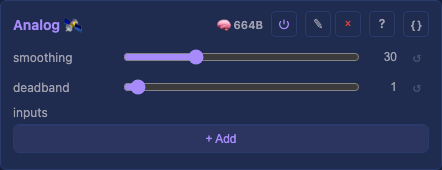
A list of ADC pins, each driving a control with a value rather than an event. The continuous twin of Button, which drives the same controls from a contact. An expression pedal is the shape it is built around.
smoothing: How hard the running average pulls toward each reading, as a percentage.deadband: How far the value must move before the control is written.inputs: The pins, each with its raw travel, an invert and a target.
Audio
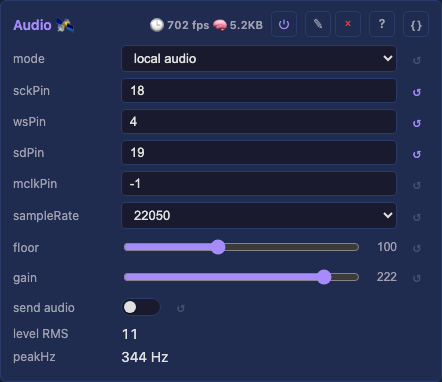
The audio source the audio-reactive effects read: a level, sixteen bands, the 31 third octaves and the peak. Local analyzes a microphone, line-in or capture device here. Receive network follows a peer's audio, MoonLight's or WLED's, and Simulate synthesizes a song for demos. A local source can send its analysis on to other devices.
mode: The source: a synthesized signal, the network, or its own input.micMode: Which kind of microphone is wired, I2S or two-wire PDM.sckPin: The bit clock GPIO, unset until entered.wsPin: The word select GPIO, or the clock of a PDM mic.sdPin: The data GPIO, unset until entered.mclkPin: The master clock an ADC or codec needs, unset for a plain mic.codec: The codec in front of the microphone,nonefor a part that speaks I2S itself.codecAddr: The codec's 7-bit address on the board's I2C bus.codecGain: The codec's analog input gain in dB, applied before its converter.device: The capture input,defaultfollowing the system setting.sampleRate: The mic or ADC sample rate.squelch: How far over the room's learned noise sound must rise before the lights answer, in dB.instrument: What the input carries: a full mix, or the drums alone, from a drum mic or bus.send audio: Send the local analysis as audio-sync packets.syncFormat: What a sending board sends: MoonLight's whole frame, WLED's packet, or both.addressing: How the analysis travels: multicast, which WLED hears, or unicast.hosts: The boards a unicast send reaches, addresses or names.simulate: The pattern: a plausible song, or a test march.syncPort: The UDP port both directions use, matching on both ends.level RMS: The level of the audio driving the effects, from any source.onsets: The drum hits heard per second, and the spectral flux.peakHz: The dominant frequency of the audio driving the effects.cpu: The share of one core the bands took last second, and the input's real rate.dynamics: The level, the room's floor, the window's top in dBFS, and the gate.notes: The three strongest pitch classes and the harmony's changes per second.key: The key over the last 15 s, and how far the notes are tuned from A440.ranges: The bass, mids and treble on the bands' scale, as the effects read them.
Attribution: softhack007, troyhacks, NetMindz, wladi
Button
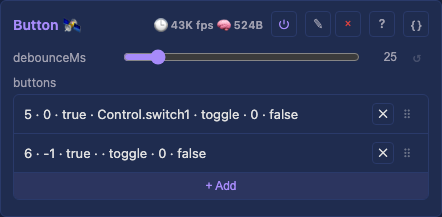
A list of push buttons, each on its own GPIO, each driving a control. A press and a UI click are the same thing to whatever they drive. A foot pedal needs no module of its own, being electrically a momentary switch. Neither does a PIR motion sensor: a set row holds the lights on while it sees motion, and off once still.
debounceMs: How long a level must hold before it counts as a press, shared by every button.buttons: The buttons, each with a pin, its wiring, a live pressed readout and a target.
Gamepad
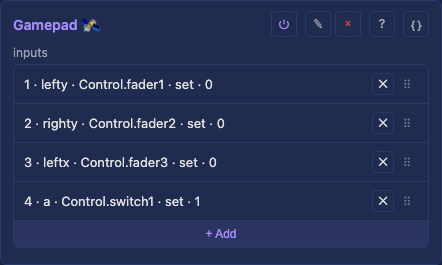
A gamepad's buttons and sticks, each driving a control through the same rows every input service uses. The pad plugs into the computer showing the interface, over USB or Bluetooth, and the browser reports it, so it works on every chip. A fresh service maps the sticks and A onto the first faders and switch.
pad: The latest pad state the browser wrote: the button bits, then four axes.inputs: The rows: each a button or stick of the standard layout, a learn button and a target.
Infrared
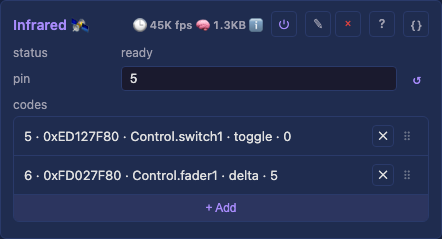
An infrared receiver whose learned remote keys drive other modules' controls. A row is the binding, so a remote with twenty keys has twenty rows. A remote press and an OSC message are indistinguishable to whatever they drive.
pin: The receiver's GPIO, unset until a board or user enters it.codes: The learned codes, each row binding one remote key to a control.
Attribution: NEC
Midi
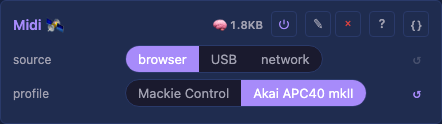
A MIDI control desk driving the control surface, in the Mackie Control or the Akai APC40 mkII layout. The desk plugs into the computer showing the interface and the browser reports it. A Mackie desk such as the iCON QCon or the Behringer X-Touch in MC mode works without setup, an Akai APC40 mkII after one choice. Faders, knobs and SELECT buttons drive the surface, and the desk follows it back with motors, lights and knob rings.
source: Where the desk plugs in: the browser's computer, this USB port, or the network.share: Pass the desk on the USB port over the network instead of driving this device.profile: The desk's layout, since each desk lays its controls out in its own messages.host: The desk on the network, an address or a name with an optional:port.port: The RTP-MIDI port of this device's session.midi: The latest desk messages the browser wrote, in hex.desk: What the desk shows: a message per fader motor, light and knob ring.hello: What the browser sends when the desk connects, such as an APC40's SysEx.
MoonLive
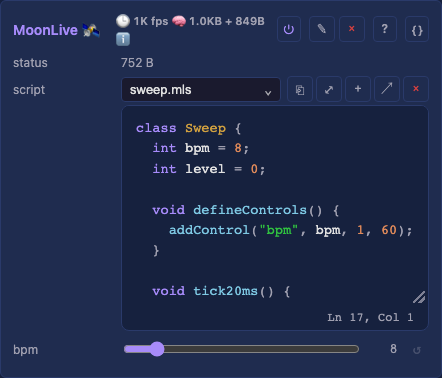
A MoonLive script that reads hardware and drives controls, the input twin of a scripted effect. A mapping row is right for a button and wrong for anything with a condition in it. A script holds state and chooses between outcomes, so a sensor nobody wrote a module for needs a datasheet and eight lines, not a release.
script: Which.mlsfile to run, picked from the script library.
Osc
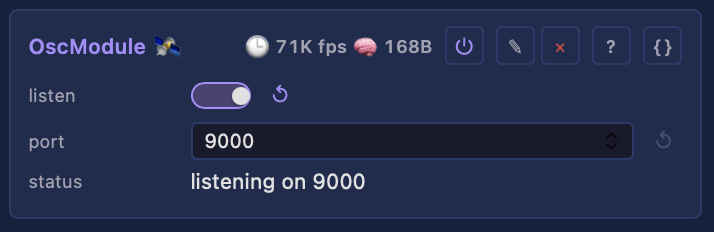
Receives OSC over the network and writes it onto this device's controls, so a fader in Resolume, TouchDesigner or TouchOSC drives MoonLight. A surface addresses the surface: the faders, encoders and switches the control module owns, which decides what each one drives. Everything lands in the same control writes the API and the UI use, so every validator still runs.
listen: Receive OSC, which writes controls with no password.port: The UDP port to listen on, the one TouchOSC uses out of the box.feedback: Mirror every change back to the surface, making this a surface, not a remote: feedback.addressing: Where feedback goes:unicastto the hosts, ormulticastto the group.hosts: Addresses or names feedback goes to (unicast).group: The multicast group feedback goes to and this device joins.feedbackPort: The UDP port the client listens on for feedback.
Picture
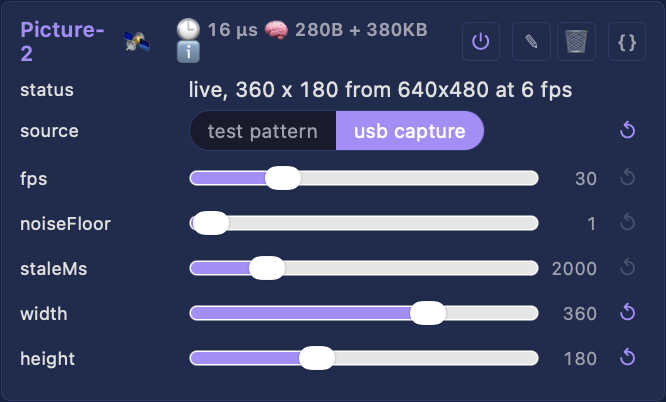
The picture the Picture effect samples onto the lights, from one source at a time. One picture service is active at a time, as with Audio, and any number of effects read its picture. The picture is drawn or decoded only while a Picture effect shows it, as Demand.h describes: with none the capture closes, the pictures are freed and the card says it is idle.
source: Where the picture comes from.fps: Frames a second asked of a capture device, which streams the nearest rate it offers.noiseFloor: Source bytes at or below this read as black.staleMs: Gap tolerated before the picture is dropped, in milliseconds.width: The picture's width in pixels, and the most a capture scales its frames to.height: The picture's height in pixels, under the same ceiling as the width.
SdCard
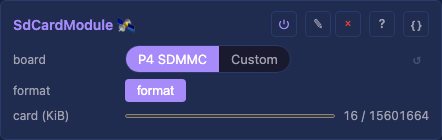
A board's microSD slot, where one is wired: its wiring, a usage gauge and a format button. Mounted, its files appear under /sd, within the one FileManager tree. This module never duplicates that tree.
board: The slot's wiring, from the presets this chip can wire; Custom sets bus and pins.bus: The bus under Custom: the SD bus, or the SD spec's SPI mode.clkPin: The clock pin under Custom, SCK in SPI mode.cmdPin: The command pin under Custom, MOSI in SPI mode.d0Pin: Data line 0 under Custom, required, MISO in SPI mode.d1Pin: Data line 1 under Custom; unset with d2 and d3, the bus runs 1-bit.d2Pin: Data line 2 under Custom; unset with d1 and d3, the bus runs 1-bit.d3Pin: Data line 3 under Custom, CS in SPI mode.pwrPin: The pin switching the slot's card power, unset where the slot has none.format: Erase the card and make it FAT32, pressed twice to confirm.card: The card's usage bar, counted in KiB.
Analog, details
Calibrating a pedal
Each row maps the travel between its two raw counts onto the target's own range, so one setup works on any target. A Select with five options takes 0 to 4, and a bool takes on and off. Watch the live raw and value readouts while moving the pedal to each end.
Targets
A row pointed at a pad does nothing, since a pedal held at 40% has no sensible reading as a preset. Scripts reach the same pins with adcRead(pin) and adcMax(), the path for a sensor whose mapping is a condition rather than a range.
Audio, details
Choosing a source
Simulate needs nothing. Receive network needs a MoonLight or WLED sender. Local idles on an ESP32 until real GPIOs are entered, and captures the picked device at once on desktop.
Wiring and capture
Microphone wiring, setting the levels and capturing what a machine plays are in Audio input.
Button, details
What a row does
Each row binds a pin to a surface control; a catalog board's first button drives Control.switch1, the lights' relay. The pressed readout shows a button working before it is bound.
A push button takes toggle. A latching switch takes set with value 1, on while closed, or flip, toggling on every change, for a staircase with a remote.
Gamepad, details
Finding the pad
A browser lists a pad only once a button is pressed with the page open. Chrome and Firefox also need a secure page, which a board's own page is not until marked once.
Connect a control surface has the steps.
Learning an input
A stick must travel a short way to bind. A pad's first stick positions are rest, so plugging one in off-center moves nothing.
Infrared, details
Learning a key
Add a row, press its learn button, then press the remote key: the next code received binds to that row. Learning a key another row holds moves the binding. The status line reports each step.
Checking a key
The status line says "set pin to receive" until a receiver pin is entered, and shows the code of a key no row holds. On some boards the receiver shares its pin with another peripheral through a board switch.
Midi, details
Where the desk plugs in
The browser reads a desk on a secure page only: the desktop app's localhost is, a board's own page needs marking once. A desk on USB or the network works on any page.
Connect a control surface has the steps.
The Akai APC40 mkII
Track faders and knobs 1 to 8 move the surface's faders and encoders, and activators flip its switches. The 40 clip pads apply presets 1 to 40: dark when empty, dim white when stored, green when applied.
MoonLive, details
Writing the script
Everything the script declares appears as a control on the card, and a slider move lands without a recompile. A compile error shows on the status line, and the service does nothing until it is fixed. A script runs on the 50 Hz poll rather than the render tick, so a heavy one costs its own tick.
Reading and sending JSON
A service reads JSON from the internet with getJson, and sends its own documents with pushJson to this device or pushJsonTo to another. A show builds its own look this way, live and never saved. The calls: the MoonLive language.
Osc, details
Getting a surface working
Turn on listening, and on feedback so the faders follow the device. A phone or tablet needs a free app and one session file.
Control a device over OSC has the steps.
The addresses
The addresses are a public contract, so a layout built on them keeps working. Send /mm/hello and the device sends every value again. Control surfaces lists them.
SdCard, details
Mounting
Wiring edits apply live, with no reboot. A pulled card is noticed within a second. A missing or unreadable card shows its status instead of retrying: insert the card, then switch the module off and on, edit a pin, or reboot.
Formatting
The card is FAT32, with 32 KB clusters. A fresh or exFAT card says so on its status, and format makes a FAT32 one in place. A large card takes seconds, shown as "formatting", and refuses transfers meanwhile. A Teensy mounts exFAT too, and its format pauses the render.
SPI mode
Reads hold, but a write over about 50 KB can stop the card until a power cycle. A card mounted that way says so on its status.