Core system¶
The device's fixed infrastructure: identity, network, provisioning, firmware, and the inspection tools. These modules are always present and wired by code, not user-added; the user does not add or delete them. User-added capability modules (Audio, IR) live in the Services container instead, see core/services.md. Every row links to its generated technical page (the full API, from the .h) and its tests. Cross-cutting rationale that no single .h owns lives in the prose sections below the table.
System modules¶
| Module | Details |
|---|---|
System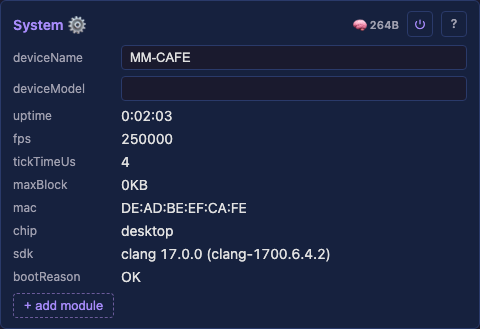 The device's identity and vitals: name (behind mDNS <name>.local, the SoftAP SSID, the DHCP hostname), uptime, heap and the tick it renders at. Its fixed inspection children (Tasks, I2C scan) hang beneath it. |
deviceName — the identity behind mDNS, the SoftAP SSID and the DHCP hostname.deviceModel — the board model (drives the installer catalog entry).mode — how much of the UI is shown, user, expert (🎚️) or developer (🔧), cumulative.logLevel — serial verbosity, defaulting to Warn. The first 60 s always logs at Info.read-only rate — uptime, fps, tickTimeUs.read-only memory — heap, psram, maxBlock, flash.read-only identity — mac, chip, cpu, sdk, bootReason.Tests: System API: reference Details: none yet |
Network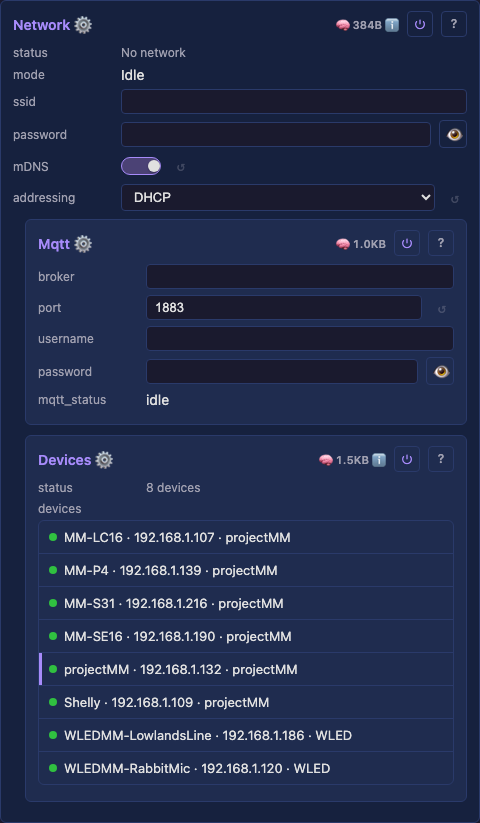 WiFi / Ethernet connectivity, static-IP configuration, RSSI and TX-power reporting. Brings the device onto the LAN before the HTTP and WebSocket servers start. |
ssid / password — WiFi credentials.mDNS — the <name>.local hostname.addressing — DHCP or static; static reveals ip, gateway, subnet and dns.ethBoard — the board's Ethernet wiring by name; Custom exposes every pin.txPowerSetting — caps the radio's transmit power for a board that browns out; 0 lifts it.read-only — mode, the interface in use, with rssi / txPower (dBm) on a live radio.Tests: Network API: reference Details: none yet |
Improv provisioning Serial/BLE Improv Wi-Fi provisioning: the web installer hands credentials to a fresh device over this protocol during the flash-and-connect flow. Improv Wi-Fi is an open standard, and its sdk-cpp / sdk-js are the specification this implements, so any Improv-capable installer can provision a MoonLight device. |
provision_status — read-only provisioning state.Tests: none yet API: reference · frame format · chunk reassembly Details: none yet |
Devices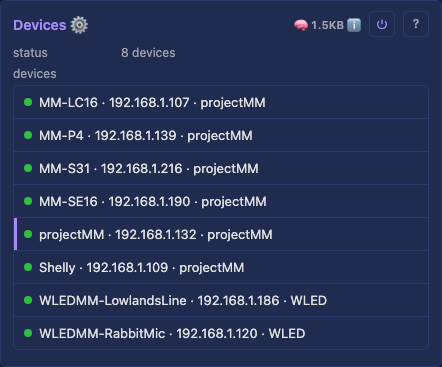 Discovers other MoonLight devices on the LAN and lists them, persisting the last-known list across a reboot. A wired-by-code child of Network. WLED apps browse on broadcast, so a device appears in them only with this on. Off is the better neighbor, since a broadcast wakes every device on the LAN to parse a packet none of them want. Presence always goes to the MoonLight group regardless, so peers find each other either way. See multicast and IGMP snooping. |
devices — a List of discovered devices; each row expands to a detail panel. Persistable.wledCompatible — also announce on WLED's broadcast address, off by default.Tests: Devices API: reference Details: none yet |
MQTT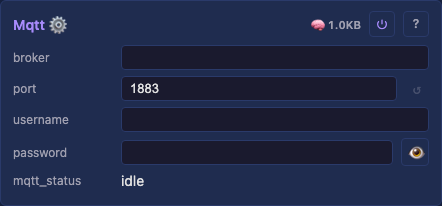 Bridges the light to an MQTT broker so a home-automation hub can control it, as a transport over the shared apply-core rather than new control logic. Our own dependency-free MQTT 3.1.1 client, disabled until a broker is set. A wired-by-code child of Network. Topics, color-wheel mapping and the Homebridge config: ⌄ details. HA already discovers the device over the WLED shim with no broker, so this stays off to avoid a duplicate entity. Turn it on for broker-only or cross-subnet setups. See the home-automation guide. |
broker — the broker hostname (e.g. homeassistant.lan) or IP. A hostname is resolved via DNS.port — broker port (default 1883).username / password — broker credentials, optional, the password stored obfuscated.haDiscovery — announce a Home Assistant discovery light, off by default.read-only — mqtt_status, from disabled and idle through to connected, or an error.Tests: MQTT API: reference Details: MQTT, details |
Firmware update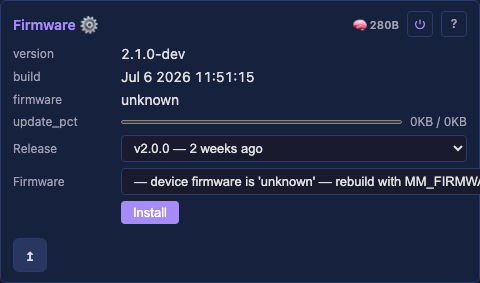 Over-the-air firmware flashing, the one operation that swaps the binary and needs a power cycle (every config change applies live; a firmware OTA does not). The choice is the app it runs, or MoonBase in the factory slot. This control's presence is also what tells the UI that installs run through the reboot-into-MoonBase cycle, behind one "updating firmware" overlay, and that a Restart in MoonBase button belongs on the card (MoonBase). |
firmware — the OTA image to flash.read-only — version, build and partition.image — on a device carrying two images, which one those describe and an install writes.Tests: Firmware update API: reference · image vetting Details: none yet |
MoonCloud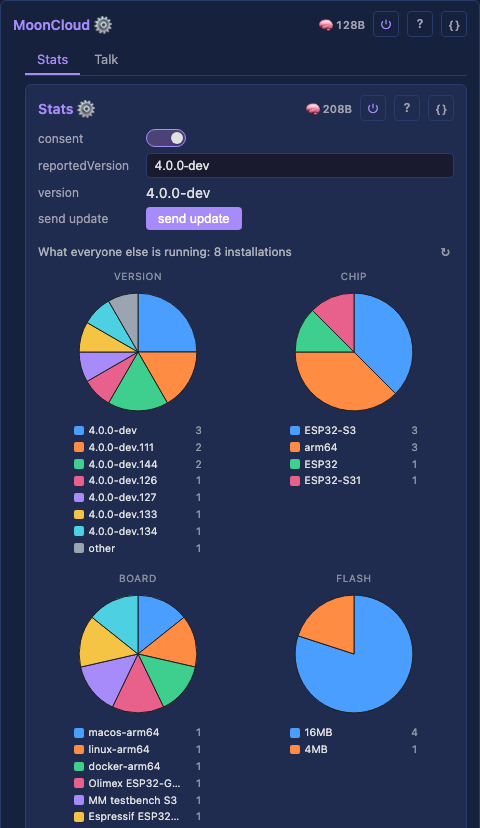 The container for everything MoonLight does with a server MoonModules runs. It holds no settings of its own: each thing it does is a child with its own consent, because a user who wants one has not thereby agreed to the other. |
Stats, below — one opt-in report per install or upgrade, and the totals back.Talk, below — a public message board between devices.Sync (planned) — device to device over the internet, a joint show across houses. Tests: none yet API: reference Details: none yet |
Stats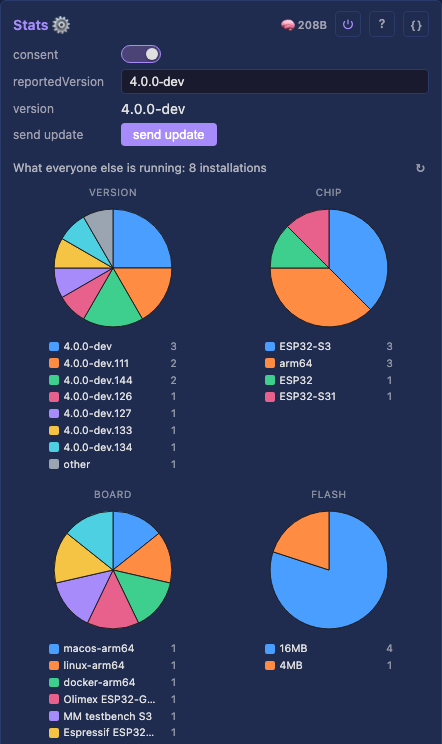 One opt-in report about this install, sent once per install or upgrade, so development effort goes where the users are. Off until you answer yes. What it sends is in the privacy policy. The two versions differing is what makes an upgrade send one report and a reboot send nothing. The button replaces this install's row rather than adding one. The report carries the chip, flash, PSRAM, SDK, device model, memory, light count, and which modules you added. It carries no device name, no addresses, no credentials and no text you typed, which a unit test asserts. |
consent — a checkbox, off by default. Nothing is sent and no identifier computed while off.read-only — version and reportedVersion, which differ exactly when a report is due.send update — reports again now, for a setup that changed without a version change.Tests: Stats API: reference Details: none yet |
Talk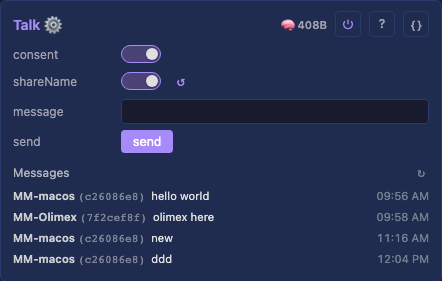 A public message board between MoonLight devices, in the shape Meshtastic's channel chat has. Off until you turn it on, and a message is sent because you typed one: nothing posts on its own. A device name identifies a person rather than a machine. Without it your messages carry the first 8 characters of your installation id, which groups them without naming you. Everything sent is public and permanent: no private message, no recipient, no delete. There is no authentication, so a sender id can be fabricated by hand. |
consent — a checkbox, off by default. Nothing is published or read while it is off.shareName — whether your device name rides along, off by default and a separate decision.message — what to say, up to 280 characters. Typing changes nothing on its own.send — publishes the message and clears the box, as does Enter in the message field.Tests: Talk API: reference Details: none yet |
File Manager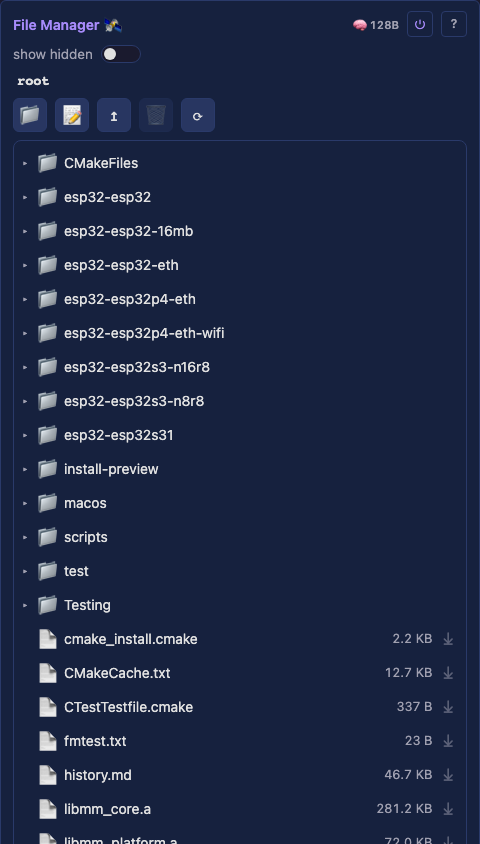 Browse and manage the device filesystem: a folder tree with an inline text editor. Distinct from Filesystem, the persistence engine. Behavior: ⌄ details. Keep it private: it contains the WiFi password. Every file is byte-verified against the listing, and an unreadable one is skipped and named. Known renames from MIGRATING.md apply before upload, then a report lists what needs an eye. Every file applies as it lands, bar network settings and the web server's port, which the dialog names. |
file browser — the panel itself: a folder tree, a toolbar and an inline text editor.Backup (⤓), download the device's files as one .json bundle.Restore (⟲), upload a backup bundle, pressing twice since it overwrites the device's files.show hidden — reveal dot-prefixed files and folders, such as .config.filesystem — read-only usage bar (used / total bytes, from the platform).lastSaved — read-only; how long ago config was persisted (read from the Filesystem engine).Tests: none yet API: reference Details: File Manager, details |
I2C scan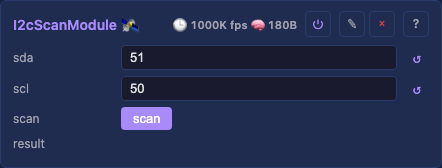 A fixed System module (wired-by-code, always present) that probes the I²C bus on a button press and reports the addresses found, a hardware bring-up tool. The bus pins default to unused (−1), so a board without an I²C device claims no GPIO for it; a board with a bus sets its pins via the catalog, or you type them for an ad-hoc scan. Passive until the scan button is pressed. A board with a fixed bus injects its own through the catalog, or you type the pins for an ad-hoc scan. The classic Arduino-ESP32 pair is 21/22. |
sda / scl — the bus GPIOs, defaulting to −1 for unused.scan — a button; press to probe the bus now.read-only — result (addresses found).Tests: none yet API: reference Details: none yet |
Tasks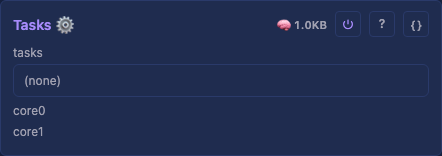 A read-only diagnostic showing what runs where: you cannot optimize which module runs on which core until you can see it. A fixed System module, wired-by-code, with each task's MoonModules nested beneath it. Each row carries name, state, core, prio and stack, the minimum free stack seen. A cpu percentage appears only in a profiling build, off by default because the run-time counter costs about 5% of the tick. Expand a row for the modules in that task, each as Name · Nus · NB · Nheap. A closing ∑ modules line cross-checks them against the tick. Empty on desktop. |
read-only — tasks, a row per FreeRTOS task.read-only — core0 / core1, what executes on each core, empty on a single-core chip.Tests: none yet API: reference Details: none yet |
Pins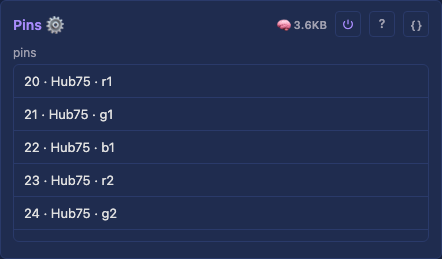 A read-only diagnostic showing which module owns each GPIO, for what role, and whether that pin is safe for it, the device's pin ownership map, keyed by physical GPIO. A fixed System module, wired-by-code. It walks the live tree for every claimed pin, holding no state, and flags double claims. Each row carries gpio, owner and role, plus live dir, level and drive. A row takes a colored edge when unsafe: red for a reserved or double-claimed pin, yellow for a driven role on a strap, per gpio-usage.md. |
read-only — pins, a row per claimed GPIO.Tests: none yet API: reference Details: none yet |
Control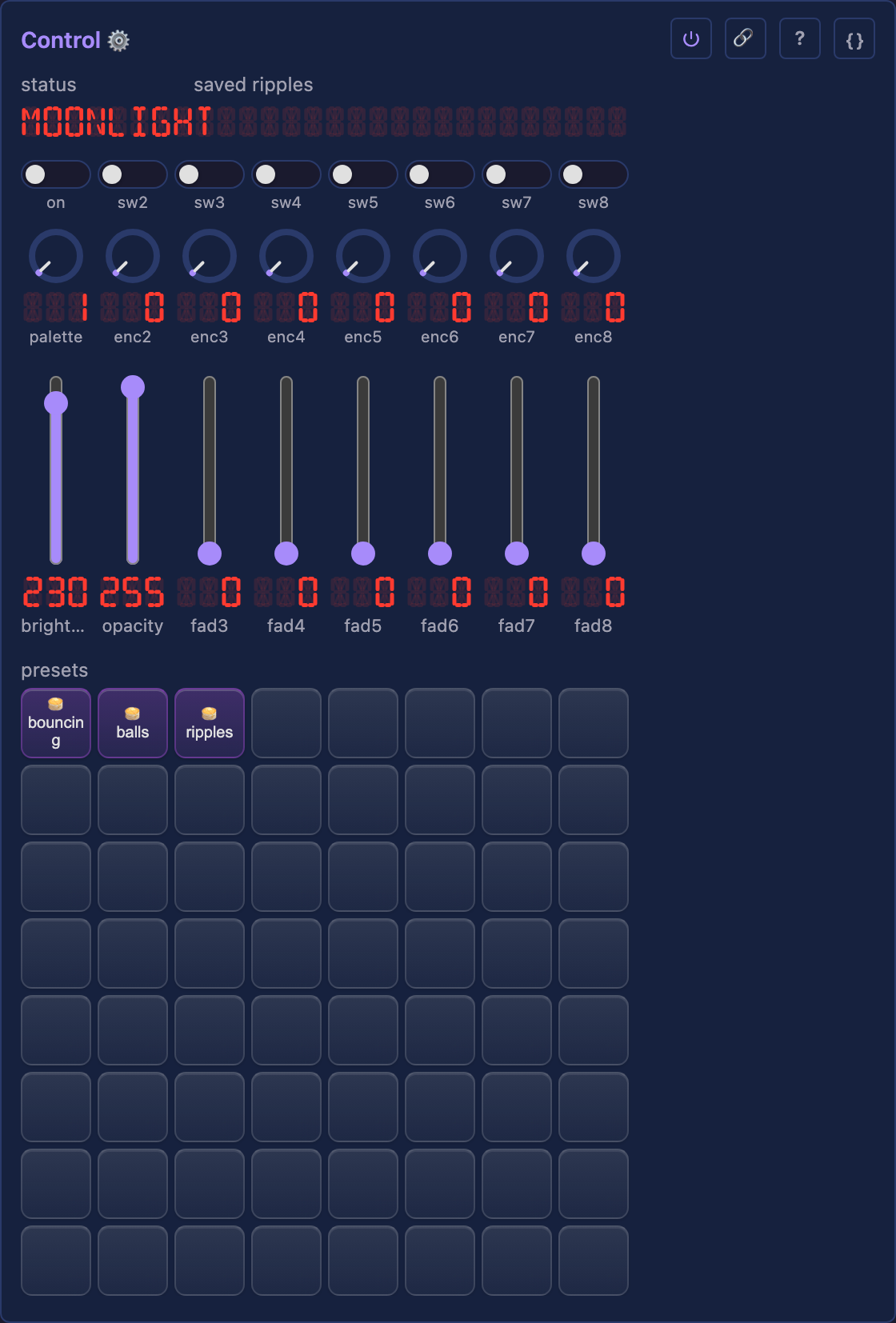 A grid of preset pads, a row of rotary encoders above them, a row of on/off switches above those, and a bank of faders below, the layout of a Mackie-style control desk (X-Touch, QCon Pro G2), so a physical surface maps onto it without a translation layer. |
presets — one pad per preset file. Click applies, right-click names, drag rearranges.switch1 … switch8, the switch row. switch1 drives Drivers.on, the rest unbound.encoder1 … encoder8, rotary encoders. Drag or scroll to turn, right-click to see the binding.fader1 … fader8, faders. fader1 drives Drivers.brightness, the rest unbound.Tests: Control API: reference Details: Control, details |
Filesystem The persistence engine: writes control values to /.config/*.json and restores them on boot, overlaying loaded values through each control's pointer during defineControls(). The File Manager browses the stored files. Calling defineControls() again at runtime, when a Select changes mode, clears and rebuilds the set, so only the controls relevant to the current mode show. That is how a conditional hidden flag re-evaluates, and how a config change applies live with no reboot. |
— Tests: Filesystem API: reference Details: none yet |
Control, details¶
A control is one named, typed value on a module, declared once in defineControls() and reachable by name from every surface: the web UI, the REST interface, a preset file, a script, a physical desk. The type decides how it renders, what it accepts, and how it persists, so a module never writes UI code and never parses its own JSON.
Control.h owns the type and its operations. The discriminator sits with the functions that interpret it, so adding a type is one enum entry plus the cases the compiler then demands, rather than a search for every switch in the tree.
Detail: technical
The module tree¶
Every module is the same building block, whatever it does: MoonModule declares the lifecycle, and Scheduler owns the top-level modules, boots them in phases, and drives every tick. A module is a node in a tree, so a driver, a layer and an effect nest the same way and the same walk serves all of them.
ModuleFactory turns a type name into an instance, which is what lets a preset file name a module this build has never instantiated.
Detail: technical · Scheduler · ModuleFactory
Surfaces and mappings¶
ControlSurface is the desk layout itself: which bank a control belongs to, and how a physical encoder or fader finds the value it drives.
InputMapping is the binding table behind it. A row says what an input does to a control: set it, step it, toggle it. A delta steps down as well as up, so one encoder covers a range without a second control to reverse it.
Detail: technical · InputMapping
Presets¶
A preset is a file: /.config/presets/<name>.json. Saving writes one, applying reads one, deleting removes one. Nothing else holds preset state, so there is no second copy to keep in step: the list is rebuilt from the folder rather than persisted alongside it. That rescan runs at startup and after every save, rename and delete, a reorder only rewrites the affected files and re-sorts the rows in place, since the folder's contents have not changed. So a preset added or removed through the File Manager appears once the module next rescans (a reboot, or a save, rename or delete on the surface), not the instant the file lands.
The name becomes the file name, so it is restricted to printable ASCII without /, \ or ., a validator on the control, which every write path runs. slot records which pad the preset occupies, so a surface arranged to match a physical desk survives a reboot.
What a preset carries¶
A preset captures exactly one top-level subtree, recorded in the file:
{
  "slot": 12,
  "captures": "Effects",
  "Effects.enabled": true, "Effects.0.type": "Layer", "Effects.0.0.type": "NoiseEffect"
}
Each captured subtree is exactly the bytes the persistence engine already writes for that module, namespaced under a <TypeName>. key prefix. Save and restore therefore reuse the engine that reconciles a tree against JSON (saveSubtreeTo / applySubtree) rather than a second serializer that could drift from it.
One subtree per preset is the whole model: a preset is a look, or a geometry, or a hardware setup, or a service configuration. Never a combination. An Effects preset is a look, and applies to a board with completely different hardware; a Drivers preset carries pin maps and is device-specific. Choosing the role is a single radio button when saving, and the pad's color says which role it holds.
A preset naming a subtree this build does not have is refused with a reason rather than partially applied, and a file written by an older build that names several subtrees is listed but not applied, so it can be seen and deleted rather than silently vanishing. A malformed file leaves the live tree untouched.
One active preset per role¶
Each subtree is a role: layout, effects, driver, service. A preset holds its own role and leaves the other three alone, so a layout preset and a look can be active at the same time, and applying a new look replaces only the look.
A pad is tinted by its role: layout blue, effects violet, driver green, service amber.
Applying is a rebuild¶
Applying a preset creates, replaces and destroys modules to match what the file describes, it is a restore, not a value overlay: a preset carrying more than the device has adds it, and one describing less removes what it omits.
Structural mutation quiesces the render worker, and mutations run inline on the render tick, so a large restore stalls rendering for its duration. The captured subtree is applied and prepareTree() runs once at the end. Presets are a cold-path feature; the tick path is untouched.
Home Assistant¶
Looks reach Home Assistant two ways, and only Effects presets travel either of them.
The WLED integration (/presets.json) is the native path: HA renders looks in its own preset dropdown, shows which one is applied, and applies one when it is chosen. This is what HA calls a preset.
MQTT discovery publishes the same looks as the light entity's effect list. HA has no preset concept over MQTT, so they arrive as effects, the same result from the user's side, reached through a different mechanism.
HA caches the preset list and re-fetches only when the device's info.fs.pmt value changes, so the device reports a revision counter there that bumps on every preset save, rename and delete, a counter rather than a timestamp, so two changes inside one second still read as two. A constant there leaves HA showing the list it read at setup forever; over MQTT the same revision re-announces the effect list mid-session.
Only looks are exposed, on both paths. A Drivers or Layouts preset rewires pins or geometry, which must not be reachable from something that believes it is choosing a color scheme, the restriction is enforced at the apply entry point, not merely by omitting them from the list.
Home Assistant's WLED integration connects on port 80 only: its host field rejects a port, so a desktop build (which defaults to 8080) needs --port 80, and that needs root:
The discovery buffers are sized to the looks this device actually has, and grow or shrink as presets are added and removed. There is no cap on the number: a fixed one would either reserve memory a small setup never uses, or silently publish nothing once the list outgrew it.
MQTT, details¶
The topic prefix is MoonLight/<mac>, a stable identifier (the last 6 hex of the device's MAC), fixed for the device's life. Renaming the device does not change its topics, so a hub's config never breaks on a rename (the WLED/Tasmota/Home-Assistant convention). It's derived, not a stored control.
Topics (for a device whose MAC ends 563cfe): the device SUBSCRIBEs to the set topics and PUBLISHes the get topics on change (and on connect, so a controller never reads "No Response"). It also publishes its friendly deviceName on the retained name topic, so a hub can show the human name while the topics stay MAC-stable:
| direction | topic | payload |
|---|---|---|
| set → device | MoonLight/563cfe/on/set |
true / false |
| device → get | MoonLight/563cfe/on/get |
true / false |
| set → device | MoonLight/563cfe/brightness/set |
0–100 |
| device → get | MoonLight/563cfe/brightness/get |
0–100 |
| set → device | MoonLight/563cfe/hsv/set |
h,s,v (hue 0–359, sat/val 0–100) |
| device → get | MoonLight/563cfe/hsv/get |
h,s,v |
| device → get | MoonLight/563cfe/name |
the friendly deviceName (retained) |
| device → get | MoonLight/563cfe/update/state |
{"installed_version":…,"latest_version":…,"release_url":…,"title":…} (retained; HA update entity) |
| set → device | MoonLight/563cfe/update/set |
target version string (empty = install latest); triggers OTA against the matching GitHub release asset |
The HomeKit color wheel has no "palette" concept, so hsv/set's hue+saturation pick the nearest palette (each built-in palette has a representative color; the closest one is selected) and the value drives brightness, the color wheel becomes a natural palette selector.
Homebridge, install homebridge-mqttthing and add a lightbulb accessory. Use the device's own MAC suffix (read it from the mqtt_status/topics, or mosquitto_sub -t 'MoonLight/#') in place of 563cfe:
{
  "accessory": "mqttthing",
  "type": "lightbulb",
  "name": "MoonLight",
  "url": "mqtt://<broker>:1883",
  "username": "<user>",
  "password": "<pass>",
  "topics": {
    "getOn": "MoonLight/563cfe/on/get",
    "setOn": "MoonLight/563cfe/on/set",
    "getBrightness": "MoonLight/563cfe/brightness/get",
    "setBrightness": "MoonLight/563cfe/brightness/set",
    "getHSV": "MoonLight/563cfe/hsv/get",
    "setHSV": "MoonLight/563cfe/hsv/set"
  },
  "onValue": "true",
  "offValue": "false"
}
Home Assistant adopts the device two ways, both zero-config:
- MQTT auto-discovery: with haDiscovery on (opt-in; off by default) and a broker set, the device announces itself on homeassistant/light/MoonLight_<mac6>/config and HA auto-creates a wired entity with on/off + brightness (the config declares brightness only; color isn't in it, so the entity has no color control). Retained across reboots. Color/palette stays on the separate hsv/set topic above, not this entity. Off by default because the WLED /json shim already gives HA a richer light (color + palette + sensors) over mDNS with no broker, leaving both on lists the device twice; enable this only for broker-only / cross-subnet setups.
- WLED integration: HA's built-in WLED integration discovers the device over the WLED /json API MoonLight already serves; on/off + brightness work with no broker.
Both can be on at once. Setup walkthrough (including exposing HA to Apple Home via HA's HomeKit Bridge, no Homebridge needed) in the Home Assistant recipe.
File Manager, details¶
The panel is a lazy folder tree (each folder loads its children on first expand) plus an inline text editor. Dot-prefixed entries (the .config persistence dir) are hidden unless show hidden is on.
- Click a folder's row to select it and toggle its expansion (▸/▾); click a selected file to open the editor.
- The toolbar acts on the selected node: + folder creates a folder inside it, + file creates an empty file (click it to edit), 🗑 delete removes the selected file, or a folder and everything inside it (press-twice to confirm), ⟳ refreshes.
- Drag files from the desktop onto a folder (or the tree) to upload them, the body streams straight to the file (any size, binary-safe; capped only by a sanity limit and the free space, which it reports if short); a per-file ⤓ streams it back to the desktop.
- The editor loads a file's text, pretty-prints JSON on open, and saves atomically; a binary file (contains a NUL) loads read-only (use ⤓ to fetch it intact). Upload and download both stream, so neither truncates.
- Create / delete are HTTP calls (
POST/DELETE /api/dir?path=), not controls, the path rides the request, so nothing is stored on the device per op.
Last-modified dates (needs an NTP time source + LittleFS mtime), binary/large + folder upload, folder-as-zip download, and .ml syntax highlighting are backlogged (backlog-core § File Manager follow-ups).