Drivers¶
A driver sends lights somewhere. It reads its slice of the Drivers container's shared buffer, applies its own output correction, and outputs — over a wire (WS2812), the network (Art-Net / E1.31 / DDP), to a smart-light hub (Hue), or to the web UI (Preview).
Several drivers can share one buffer, each driving its own slice. Every driver starts with the same shared controls, then adds its own. Drivers are added per board through the catalog (deviceModels.json); PreviewDriver is the one boot-wired driver.
Jump to: shared controls · LED · Network · Smart light · Preview
Shared driver controls¶
| Name | Preview | Controls | Links |
|---|---|---|---|
| Shared 💫 · every driver Added once by DriverBase so no driver re-implements it: a per-driver output correction (how this driver's slice looks) and a source window (which slice of the shared buffer it reads). Every driver card leads with this block; its own controls follow. |
 |
localBrightness — this driver's dim (0–255), multiplied with the global brightness into one LUT; both sliders reach the output.lightPreset — the light preset this driver applies per light (channel order / RGBW synthesis). At runtime the driver holds the preset's stable id, so reordering presets never disturbs the reference; the reference survives a reboot because the preset's name is persisted and re-resolved on load. The one caveat is renaming: within a session the id keeps the link, but after a reboot a renamed preset no longer matches the persisted name, so the driver falls back to the default preset — re-pick it if you rename a preset a driver uses.whiteMode — how the white channel is derived for an RGBW strip, applied only when the referenced preset carries a W channel.start — first light of the shared buffer this driver reads (default 0).count — how many lights from start this driver drives. Blank / default drives all lights; set a number to output only that slice — the way multiple drivers each own a section of one buffer (an onboard status LED at 0, the main strip from 1). |
Technical |
LED drivers¶
| Name | Preview | Controls | Links |
|---|---|---|---|
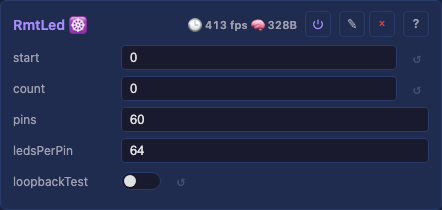
| LED driver 💫 · wire Addressable WS2812B-class LEDs over a wire, same controls and same wire contract however the bits reach the pins. Two drivers: RMT for a few strands, and ParallelLedDriver for many (up to 16) clocked out at once. The parallel driver has a peripheral control that picks the DMA peripheral, offering only the ones the chip supports: Which to pick, and why: details. Plus the shared controls above: The card reads top-down as invariant controls → peripheral divider → peripheral-specific controls: The parallel driver has no timing control: its bit timing comes from the bus pixel clock, which the nanosecond fields only approximate, so changing it means changing that clock in the platform layer. A strip that needs non-default timing runs on the RMT driver. - doubleBuffer — the async second frame buffer (encode overlaps the wire). Shown on i80 and Parlio (they route through a real transaction queue); hidden on MoonI80, which runs single-buffer (its speed comes from the streaming ring, not from double-buffering a whole frame). - pinExpander — the 74HCT595 fan-out (one pin → 8 strands). Shown on the LCD_CAM family (i80 and MoonI80), hidden on Parlio (its single-shot transfer can't carry the ×8 fan-out frame). - i80: the WR/DC bus pins (clockPin/dcPin). MoonI80: shiftOverclock and the ring* geometry cluster. Parlio: no extra pins. Two ParallelLedDriver instances that select peripherals on the same hardware block (e.g. both i80 and MoonI80, which share LCD_CAM) conflict — the second idles with a status. Different blocks (RMT + Parlio + i80 on a P4) coexist. |
|
i80 — the esp_lcd i80 bus (LCD_CAM on any chip that has it — the S3, P4, and S31 — the I2S peripheral on the classic ESP32). The general default for many strands.Parlio — the Parallel-IO peripheral (P4 and S31).MoonI80 — our own GDMA below esp_lcd (LCD_CAM chips only — S3, P4, S31): a streaming ring for more lights than one DMA buffer holds, plus a 74HCT595 pin expander that turns 6 pins into 48 strands.pins — data GPIO list, e.g. 18,17,16, or inclusive ranges like 20-23 (= 20,21,22,23) mixed freely (20-22,35,38-40). One strand each — or, with the MoonI80 pin expander, one group of 8. Empty idles until set; changing it re-inits live.ledsPerPin — lights per strand, following the broadcasting idiom (cf. NumPy / CSS shorthand): empty = even split of the window; one number = that many on every strand (64 → 64 each); a list 3,4,5 = one per strand by position (a short list even-splits the remainder). Shorter strands go dark early while the longest finishes. Through an expander an entry is one strand, not one pin, so two strands on one '595 can differ.timing (RMT only) — the bit rate on the wire. 800kHz WS2812B/SK6812 is the default and drives WS2812, WS2812B and SK6812 alike, which is why it fits nearly every strip. 400kHz WS2811 doubles the bit cell for a 12V WS2811 strip in its low-speed mode: on the default timing such a strip decodes the first few lights and then reads noise, which looks like flicker and stale colors past a handful of LEDs. 800kHz WS2811 fast is the same 1.25 µs cell with narrower pulses. custom reveals t0hNs / t1hNs / periodNs so a strip matching no preset is a control change rather than a firmware release. Named by speed rather than by chip because the names do not partition the timings: SK6812 and WS2812B decode identically, and "WS2811" covers two different rates. A 400 kHz strip takes twice as long per frame, so it halves the achievable frame rate at a given light count.peripheral (the divider) — the DMA peripheral driving the bus (i80 / Parlio / MoonI80), filtered to what the chip supports. Everything above it is invariant (which LEDs and how many); everything below is what the chosen peripheral supports. Switching it re-surfaces that peripheral's own controls and re-inits live. Always shown — with a single option it reads as a labeled indicator of what's driving the LEDs.peripheral-specific (below the divider) — each shown only on the peripherals that support it, so the set changes when you switch peripheral:Expert-only (🔧, shown when System.expertMode is on): loopbackTest — a TX→RX loopback self-test (jumper the first pin to loopbackRxPin), verdict in the status field, with loopbackTxPin/loopbackRxPin its wiring. |
RMT · shared + peripherals RMT · Parallel · peripherals: i80 · MoonI80 · Parlio WS2812B on FastLED / WLED prior art, and the clockless I2S / RMT / Parlio techniques of hpwit (Yves Bazin), whose work is why a single board can drive dozens of parallel strands at all (analysis) ⌄ details |
Network drivers¶
| Name | Preview | Controls | Links |
|---|---|---|---|
| Network Send 💫 · UDP Streams the buffer over UDP as Art-Net, E1.31 / sACN, or DDP — one burst per frame, compatible with Falcon/Advatek controllers, xLights, and LedFx. Feeds one or more receivers from a single driver: each gets its own slice of the window, unicast to its own address. follows automatically. E1.31 multicast sends to sACN's own per-universe group ( 239.255.{universe_hi}.{universe_lo}) rather than the configured address, so one send reaches every receiver that joined that universe. It is opt-in rather than the default for E1.31: the saving only materialises on a switch that does IGMP snooping, and firmware cannot tell. See multicast and IGMP snooping. Unicast is the default because Art-Net 4 requires it and because broadcast makes every host on the LAN parse every packet; a broadcast address still works if you type one. The full addressing rationale (and the one case where broadcast is the better tool) is on the detail page. A DMX chain of MIXED fixtures: one driver per fixture type. lightsPerIp splits a window between receivers that all share one preset, so it cannot describe a chain where the fixtures differ. Add a driver per type instead, each reading its own start/count slice of the same buffer with its own lightPreset. Two moving-head types followed by RGBW pars is three drivers: |
driver | start | count |
| Panel Card 💫 · raw Ethernet Streams the buffer to LED panel cards as raw Ethernet frames, compatible with ColorLight 5A-75 cards. In vendor terms (ColorLight, NovaStar, Linsn) these are receiving cards, and this driver takes the place of the sending card that normally feeds them. These take a sender-card feed rather than a pixel protocol, so the driver sends row-addressed data followed by a sync frame that latches the image. The board renders and sends: effects, layers and MoonLive run on the device, so one board replaces a host PC driving the same panels. Add a Network Receive effect to take Art-Net in as well. These cards need a 1 Gbit link. Not for bandwidth — a 256×256 panel at 40 fps is only ~65 Mbit/s — but for wire time: the cards have no buffering and latch on the sync frame, so a whole frame must arrive inside the inter-frame window. At 100 Mbit the same bytes take ten times as long, which breaks that timing and shows up as tearing or wrong rows rather than as an error. The driver reads the negotiated speed and warns, but still sends: a small panel may be fine, and a measurement beats a refusal. No IP is involved — no address, no port, no DHCP — so the driver works on a link that never got a lease. |
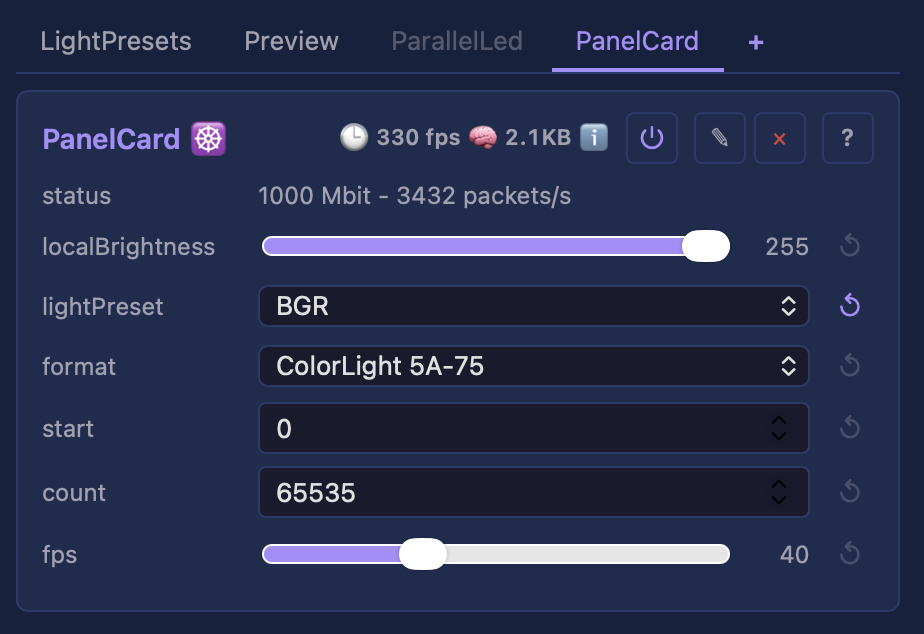 |
format: the card's wire format (ColorLight 5A-75).firmware: the card's firmware generation, v12 and older (default) or v13 and newer. v13 and newer act on the second copy of the brightness and sync frames, so both are sent twice; v12 and older act on the first, and take a second sync as another latch. Set to v13 and newer on a downgraded card, the wall updates once every few seconds. Reading and changing a card's version: the tutorial.No geometry controls: the wall comes from the Layout. A PanelsLayout already states how many panels there are, their size, wiring order and snaking; this driver reads the finished picture and cuts it into card rows. A row wider than 497 pixels goes out as several packets.interface: which NIC to send from on desktop/Raspberry Pi, a dropdown of the DETECTED adapters (friendly names on Windows via Npcap, kernel names on Linux/macOS), re-listed on every control change so a hot-plugged NIC appears. The choice is remembered by adapter NAME, never by index, so it survives reboots and Npcap reinstalls. none (capture only) records frames without sending. Not shown on ESP32, which has one MAC. Raw sending is privileged: root or CAP_NET_RAW on Linux, BPF access on macOS, and Npcap or WinPcap on Windows; without it the driver records frames instead and says so. Step-by-step per OS: Driving LED panels with a receiving card.fps: frame-rate limit (default 40, 1 to 120). |
Tests Technical ColorLight 5A-75 documented byte layout. Inspired by FPP (Falcon Player), the show player that drives these cards from a Raspberry Pi: seeing an FPP rig feed a wall of panels is what prompted this driver, since a board already rendering those frames can send them itself and remove the host from the installation. FPP is also the reference point for what good looks like here, sustaining 50 fps. |
Smart light drivers¶
| Name | Preview | Controls | Links |
|---|---|---|---|
| Hue 💫 · bridge Drives Philips Hue bulbs as pixels: each color bulb in the driver's window becomes one pixel, pushed to the bridge over its HTTP API. Paced to the bridge's ~10 cmd/s limit — smooth ambient color, not strobing. |
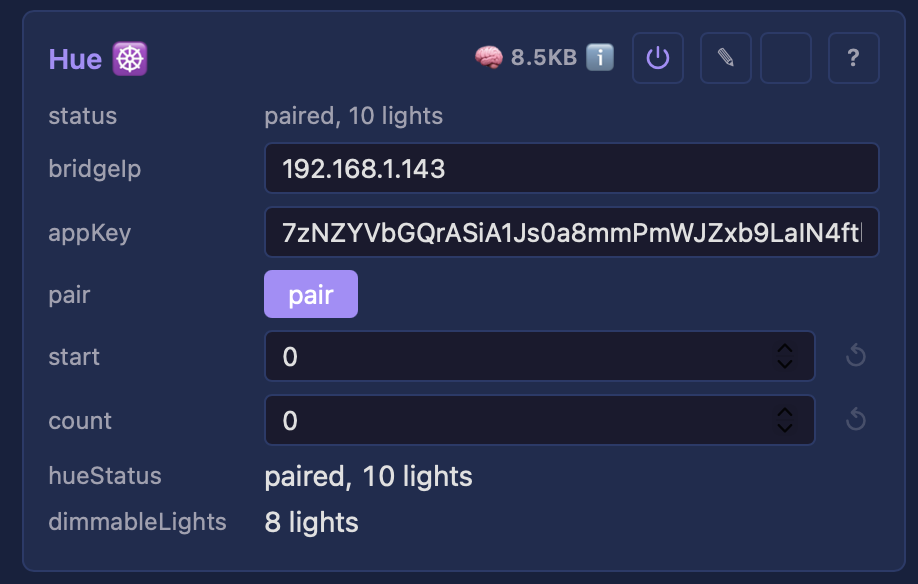 |
bridgeIp — the bridge's LAN IPv4.appKey — the Hue app key; filled by pair, persisted.pair — button: press it, then the bridge's physical link button within ~30 s to claim a key.room / light — dropdowns narrowing which color lights are driven (both default All). |
Tests Technical projectMM, on the Hue v1 CLIP API |
Preview drivers¶
| Name | Preview | Controls | Links |
|---|---|---|---|
| Preview 💫 · web UI Streams a true-shape 3D preview to the web UI as a point list, only the real lights at their real positions, so a sphere/ring/arbitrary map shows in its true shape. The one boot-wired driver. It streams on its own WebSocket channel ( /wsp), so a large frame never delays the control plane, and it runs only while a viewer requests it: dismissing the preview or leaving the tab stops the work at the source entirely. The device reports dropped frames in each frame it sends; your browser trades detail for rate on that signal, so a fast connection previews finer than a slow one. See § Preview, details. Moving heads show their beam. When the rig's fixtures carry pan and tilt, the preview also streams each head's aim, and the browser draws a short 3D ray from the fixture in the direction it points. A rig without moving heads never sends that message and pays nothing for the feature. The wire carries where a head POINTS, never a rendered look, so a richer visual later (a cone with falloff rather than a ray) is a browser change and not a protocol one. The beam is a ray today because beam angle and throw distance are fixture attributes the fixture model does not carry yet, and drawing a cone would mean inventing them. Color and aim alternate frame by frame, since the transport keeps one send in flight: a head sweeps far slower than a pixel changes, so half rate each is not visible on the beam. |
 |
targetFps, the frame rate the preview aims for (default 24, 1–60). The device never sends faster; when the connection cannot keep up, the browser trades detail to get closer: lower it for full detail at a slower rate, raise it for a smoother but coarser preview. |
Tests Technical projectMM, on MoonLight's PhysicalLayer model |
| NDI 🖥️ · video out Publishes the layer as an NDI video source, so OBS, Resolume, TouchDesigner or any other NDI receiver picks projectMM up by name, on this machine or another on the network. Where the Preview driver draws the lights for a person, this hands the same frame to a production tool as video. The grid's physicalWidth × physicalHeight becomes the frame, one light per pixel, with the driver's own output correction applied so a receiver sees what the wall sees. Desktop only, and you install the NDI runtime yourself, projectMM never ships it. Without it the driver reports NDI runtime not installed and nothing else changes. See § NDI, details. |
— | sourceName — the name a receiver lists. Blank uses the device's own name.fps — frame-rate ceiling (default 30, 1–120). The driver sends no faster than this and declares the rate in every frame. |
Technical projectMM, against NewTek/Vizrt's documented NDI C API |
| HLS 🖥️ · video out Streams the layer as H.264 over HLS from the device's own HTTP server: open the url the card shows in VLC, a browser, or hand it to an Apple TV (VLC for tvOS, or open it in Safari and AirPlay the video). Where NDI feeds production tools, this feeds anything that plays video. The grid becomes the frame, output correction applied, so a viewer sees what the wall sees. Latency is HLS's own: expect 2-5 seconds glass-to-glass, so this is for watching, not for live-control feedback. Runs on desktop (where you install ffmpeg yourself) and on the ESP32-P4 (which encodes in hardware, no ffmpeg). See § HLS, details. |
— | targetFps — encode-rate ceiling (default 30, 1–120); the render loop runs faster and extra frames are not encoded. This is also the bandwidth knob: the bitrate is derived, not a setting.scale — video pixels per light (default 0 = auto, which enlarges a small wall just enough to be watchable). Each light becomes a solid square block, never an interpolated blur.encoder — which ffmpeg encoder to use (desktop only; the P4 has just the one).read-only — url (the playable address), and the status line reports streaming state, dropped frames, or why the encoder stopped. |
Technical projectMM; encoding by the user's ffmpeg on desktop, the P4's H.264 block on device (HLS is Apple's RFC 8216) |
HLS, details¶
On desktop you install ffmpeg yourself (any 5.x+, on PATH), projectMM never ships or links an encoder: brew install ffmpeg (macOS), winget install ffmpeg (Windows), sudo apt install ffmpeg (Debian/Ubuntu/Raspberry Pi OS). Without it the driver reports ffmpeg not found and nothing else changes. The encoder control picks which one ffmpeg uses: libx264 (the default, in practically every build) is software, while h264_videotoolbox on a Mac (~10% CPU for a 1024x1024 stream on Apple Silicon), h264_v4l2m2m on a Raspberry Pi and h264_nvenc on NVIDIA offload it to hardware and are worth picking on large grids. An encoder your ffmpeg lacks starts and exits immediately; the status then reads encoder exited - check ffmpeg.
On the ESP32-P4 there is no ffmpeg and no filesystem in the path: the chip's own H.264 block encodes, projectMM packages the MPEG-TS itself, and segments are served from a RAM ring rather than written to flash, which at one segment per second would wear it for nothing. The encoder control is absent, since the hardware offers only one.
Sizing the picture. The P4's encoder takes only EVEN dimensions between 80x80 and 1920x2032; an odd wall has its scale doubled so both axes come out even, and a wall whose scaled size exceeds the maximum is refused with a status saying so rather than streaming something the hardware cannot encode. Desktop ffmpeg has none of these limits. The floor is what the auto scale exists for: the P4 will not accept a frame smaller than 80x80, and a small wall streamed 1:1 arrives as a postage stamp in the player. scale at 0 (the default) therefore picks the smallest whole factor that lifts both axes to 80: a 20x10 wall streams as 160x80 rather than being refused, and a wall already past 80 stays 1:1. One factor serves both axes, so the aspect ratio is preserved and each light stays a square block. Raising scale by hand on an already-large wall costs real time (a 128x128 wall at scale 4 measures about 60 ms per frame against 1 ms at 1:1) and buys nothing a player's own zoom does not.
The bitrate is derived, not a setting. It follows from the grid size and targetFps at about 0.1 bits per pixel per frame, which puts a 512x512 wall at 30 fps near 800 kbit; a 128x128 lands under the 500 kbit floor the derivation clamps to. targetFps is the knob for bandwidth, and the better trade for LED content: fewer frames rather than a blockier picture.
Where the segments live. On desktop, the transient /.hls/ directory, served at /hls/ and excluded from config backups. Large grids trade framerate, the render loop being single-threaded: 512x512 streams smoothly, TV-native resolutions do not yet.
Preview, details¶
Close the preview when you do not need it. The device renders preview frames only while the preview pane is open. Dismissing it stops that work entirely, which frees the device for rendering and keeps the UI responsive on a large layout, worth doing while you are editing effects on a big wall.
The preview thins itself out. When the connection cannot carry full detail, the preview shows a regular sample of the lights rather than all, the status reads preview 1/4 and so on. The device reports every frame it had to drop, and your browser reacts: persistent drops trade detail for rate, drop-free stretches earn the detail back one step at a time, and a step that brings the drops back is taken back with growing patience, so a borderline connection settles instead of flickering between sizes. A slow effect drops nothing, so it never costs preview detail. A fast connection previews everything, with nothing to configure.
If the preview looks choppy, it is the connection rather than the device: frames are dropped rather than queued, so the wall itself is never held up by the preview. Lower targetFps if you would rather keep full detail at a slower rate.
NDI, details¶
You install the NDI runtime yourself, projectMM cannot ship it. Until you do, the driver reports NDI runtime not installed and everything else works normally.
| OS | Where it comes from |
|---|---|
| macOS | NDI Tools (free). It puts the runtime inside its app bundles rather than system-wide, which projectMM knows to look for; a Resolume install also carries one. |
| Windows | The NDI Tools or SDK installer puts Processing.NDI.Lib.x64.dll on the PATH. |
| Linux | The NDI SDK. |
To see the output you need a receiver. NDI Video Monitor (part of NDI Tools) is the simplest; OBS gains an "NDI Source" via the DistroAV plugin. projectMM appears by the name in sourceName, or the device's own name when that is blank.
Desktop only. No NDI runtime exists for the ESP32 chips, so the driver is not offered there. An ESP32 reaches the same tools over Art-Net, sACN or DDP instead, send with the Network Send driver, receive with the NetworkReceive effect.
Status line
| It says | It means |
|---|---|
NDI runtime not installed |
Install it, per the table above |
could not create the NDI source |
The runtime is there but refused, usually a name clash with another source |
sending <w>x<h> at <n> fps |
Live; look for it in your receiver |
LED driver — details¶
Which driver?
RMT is its own driver; the rest are peripheral choices on the one Parallel LED driver.
| Want | Use | Why |
|---|---|---|
| A few strands, any ESP32 | RMT driver | The default. Simple, no bus width to think about, one channel per strand. |
| Many strands (up to 16) | Parallel LED, peripheral i80 |
The scale path where RMT runs out of channels. One DMA transfer drives every strand at once. |
| Up to 16 strands on a P4 | Parallel LED, peripheral Parlio |
The P4's own parallel peripheral — it generates its pixel clock, so there is no clock pin to spend. |
| More lights than fit one DMA buffer, or more strands than you have GPIOs | Parallel LED, peripheral MoonI80 |
The same LCD_CAM output as i80, on our own DMA: it streams the frame, and it drives a 74HCT595 pin expander — 6 pins → 48 strands. |
MoonI80 and i80 drive the same pins the same way; only the DMA underneath differs. Start with i80 — it is the proven path. Choose MoonI80 when you hit one of its two limits. Both are peripheral choices on the one Parallel LED driver, so you switch between them with the peripheral control on one board with no reflash.
RMT vs the three parallel peripherals. All drive WS2812B-class strips with the same pins / ledsPerPin / loopback* controls and the same wire contract; they differ in parallelism, chip, and — for the two i80-bus peripherals (i80 and MoonI80) — in who programs the DMA.
Lane, pin, strand. A lane is one bus data line; a strand is one chain of LEDs. The i80 bus is 8 or 16 lanes wide (a hardware fact, not a setting), but you configure only the pins that drive something, at any count from 1: the driver rounds the bus up around them and parks the spare lanes on a pin the peripheral already drives, where nothing reads them.
- Direct: one pin = one lane = one strand. 1–16 strands.
- Through an expander: each data pin feeds one '595 and fans out to 8 strands, so 1–8 data pins → up to 64 strands (the driver's ceiling). The latch also costs a lane — the peripheral has only one clock output, so it has to ride a data line — but the strand ceiling binds first. hpwit's board populates 6 pins → 48 strands.
| Output | peripheral |
Chip | Strands | Extra controls | Notes |
|---|---|---|---|---|---|
| RMT (detail) | (own driver) | any ESP32 (classic 8 ch, S3 4, P4 4 DMA) | one per RMT TX channel | loopbackFrame |
The general single-/few-strand output; default for classic + S3 board entries. loopbackFrame bit-verifies a whole frame, catching frame-rate / RF corruption a 24-bit burst misses. |
| Parallel LED | i80 |
S3 / P4 / S31 (LCD_CAM) · classic (I2S) | 1–16 | clockPin dcPin |
Over IDF's esp_lcd i80 bus. The bus is 8 or 16 bits wide (≤8 pins → 8-bit, 9–16 → 16-bit) — but the pin count is free: configure only the pins that drive something and the driver rounds the bus up around them, parking the spare lanes on a pin the peripheral already drives. clockPin/dcPin are i80 bus lines the LEDs ignore: on the classic ESP32 clockPin defaults to unset (the platform sinks it onto an input-only pad, so no GPIO is spent) while dcPin needs a real pin because the bus toggles it in software every frame; on the LCD_CAM chips both need a real pad. On the classic the bus is an I2S peripheral and takes instance 1, leaving instance 0 (the only one with a PDM converter) for the microphone, so both run. Capped by one contiguous DMA buffer: the classic backend is internal-RAM only (I2S can't reach PSRAM) → 2048 lights; LCD_CAM draws from PSRAM → 16384. Over the cap it idles with a status rather than crashing. |
| Parallel LED | MoonI80 |
S3 / P4 / S31 (LCD_CAM only) | 1–16; ×8 per pin with an expander (6 pins → 48 strands) | clockPin pinExpander latchPin useRing ringAuto; 🔧 shiftOverclock ringRows ringBufs ringPadUs |
The same LCD_CAM output as i80 on our own GDMA chain, which buys two things esp_lcd cannot: a frame streamed through a small buffer pool instead of held whole (so length stops being a memory question), and a 74HCT595 pin expander — one GPIO fans out to 8 strands. ringAuto (default on) derives the streaming geometry per config, so the manual ring* knobs and shiftOverclock (a faster '595 clock for short-wired rigs) are expert-only tuning — the full guide is on the technical page. No dcPin at all, and WR is routed only when a '595 needs it as its shift clock. Not on the classic ESP32 (its i80 is the I2S peripheral). The prime-only ring (frame fits the buffer pool) and the pin expander are wall-solid; the lapping ring (very long strands, where the ISR refills from a PSRAM source) has a known last-row sparkle on the largest configs, tracked in the backlog. Why + what it costs: ADR-0014. |
| Parallel LED | Parlio |
ESP32-P4 | 1–16 | — | The P4's parallel path; Parlio generates its own pixel clock, so no clock/dc pins to spend. Bus width follows the pin count. On P4-NANO a known-good 8-set is 20,21,22,23,24,25,26,27. |
The Parallel LED technical page carries the wire contract, buffer slicing, memory sizing, and the loopback self-test; each peripheral's own page (i80 · MoonI80 · Parlio) covers its DMA specifics.
What the peripherals share. The three parallel peripherals are thin shells the one Parallel LED driver selects between; two common pieces do the real work — worth reading if you care how a frame is actually built:
- Parallel LED driver — the shared body: strand slicing, the encode loop, the async double-buffer, the latch pad, the loopback self-test. A peripheral backend adds only its own DMA calls.
- Slot encoder — the wire format itself. Each WS2812 bit becomes three bus slots (pulse start / data / tail), and the data slot is an 8×8 bit transpose: lanes in, bit-planes out, so one bus word carries the same bit of every strand. It is the render loop's measured hot spot.