Making beautiful effects
Most LED effects are written a light at a time: loop over the pixels, work out a color, write it. That works, and it takes a long time to get from "it lights up" to "I want to keep watching it".
This page is about the other way. projectMM ships a set of power functions: the handful of algorithms that computer graphics has used for forty years to make things look alive. You do not implement them, you compose them. And because most of that vocabulary is reachable from MoonLive scripts as well as from compiled C++, a few dozen lines of script gets you an effect that would otherwise be a project.
Never opened the interface? Start with Install & first light and How projectMM works, then come back.
1. The one idea: a field
Here is the shift that makes everything else easy.
Instead of asking "what should pixel 37 be?", ask "what is the value of this field at (x, y, z), right now?" The field is a function of position and time. You sample it once per light, turn the number into a color, and the picture falls out.
That is what a shader is, and it is why an effect written this way is resolution-independent: the same code fills a 16-light strip and a 12,288-light wall, because it never counted pixels in the first place.
Fields also compose. Add two, and you get a third. Use one to bend another's coordinates, and you get something neither could produce alone. That is the whole trick, and the rest of this page is the vocabulary.
2. Noise: the raw material
Random numbers look like static. Noise looks like nature, because a noise value is close to its neighbors: it wanders instead of jumping.
Ken Perlin published it in 1985 (An Image Synthesizer), after developing it on the movie Tron; it later won him an Academy Award. projectMM uses his own revision, improved noise (SIGGRAPH 2002), which removes the directional bias of the original.
Three things to know, and then you can use it:
Scale is everything. noise(x, y, 0) reads one value per light and looks like
static, because adjacent lights land in completely different parts of the field.
Multiply the coordinate down and you zoom in: noise(x * 20, y * 20, 0) gives
broad soft blobs. Getting this wrong is the single most common reason a noise
effect looks like colored snow.
Time is just another axis. Do not recompute a 2D field and shift it. Sample a
3D field and walk along z: noise(x * 20, y * 20, div(t, 32)). The picture morphs
instead of scrolling, which is what makes it look organic rather than mechanical.
1D, 2D and 3D are the same call. One axis for a strip, two for a panel, three
for a cube, or two of space and one of time. noise() takes what you give it.
(div(t, 32) rather than t / 32: MoonLive spells integer division div, and
t is the millisecond clock every script is handed.)
3. Octaves: detail at every size
One noise sample is a soft blur. Nature is not soft: a coastline has bays, and the bays have inlets, and the inlets have rocks.
fBm (fractional Brownian motion, the term is Mandelbrot's) is the answer, and it is embarrassingly simple. Sample the field several times, each at double the frequency and half the strength, and add them up. Each pass is an octave, the name borrowed from music, where an octave is also a doubling.
| Octaves | What you get | What it costs |
|---|---|---|
| 1 | soft blobs | 1 sample |
| 2 | shape with texture on it | 2 samples |
| 4 | rock, cloud, terrain | 4 samples |
Octaves are the cost knob of every field effect: doubling them doubles the work per light. Two is usually the sweet spot; four is for when the fixture is small enough to afford it.
One measured detail worth knowing: octaves partly cancel, so their sum is
narrower than one octave's range. Four octaves span roughly 54..199 of 0..255
rather than the full sweep. projectMM re-widens the result for you, so fbm at
any octave count still uses the whole range and your thresholds keep working.
4. Warp: the trick that sells it
This one is worth learning on its own, because it is the difference between "some noise" and "that looks like smoke".
Domain warping (popularized by Inigo Quilez, of Shadertoy) means using noise to move the place where you sample noise. You are not adding a field to a field, you are bending one field's coordinates with another.
The result flows, folds and curls back on itself. Almost every "liquid" or "marbled" look you have admired is domain warping.
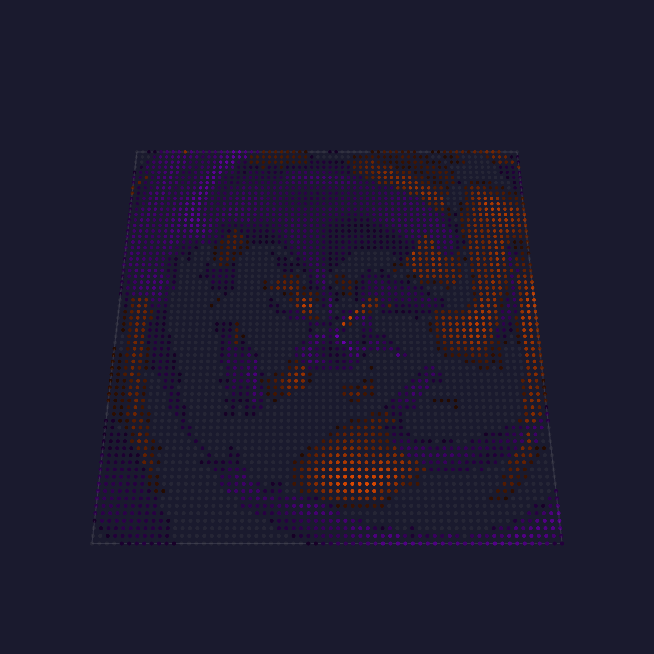
That is Aurora: a few layers of warped noise, each drifting on its own clock, read around the center instead of across the grid, with a contrast window that pushes most of the field to black so distinct curtains survive.
Every technique on this page is a published one, credited to the people named throughout. Stefan Petrick is the person who brought that shader vocabulary to LED panels and showed what it does there, through Animartrix, FunkyNoise and ColorTrails: noise read in polar coordinates, layers on independent oscillators, a contrast window that turns a soft field into distinct curtains, emitters carried by a flow field. That is the tradition this page's effects sit in.
5. From lines to fields: the ladder
The power functions are a ladder, and the rungs are worth knowing because each one buys a different kind of beauty.
Lines and shapes are the bottom rung. line (Bresenham 1962), circle
(Bresenham's 1965 midpoint form), disc, sphere, text, sprite. Exact,
cheap, and the right answer when you want a thing on the panel rather than a
texture.
Signed distance fields are the same shapes, made soft. Instead of "is this
pixel inside the circle", sdCircle answers "how far is this pixel from the
edge", negative inside. A distance is a number you can threshold, glow, outline or
blend, and two distance fields blend into shapes neither one describes. The
catalog follows Inigo Quilez's.
Particles give you motion with memory. A particle pool carries position and
velocity, and gravity, drag, bounce and collide act on all of them at
once. Use this when the thing that matters is that a spark fell, and the pixels
are just where it happens to be.
Fields are where this page started: noise, fBm, warp, sampled per light.
Transport is the top rung, and it is what this release added. A field says
where things go; transport actually carries light along it, frame after frame.
advect moves a whole plane along a velocity field by asking, for each
destination, where its contents came from. decay fades what is already there by
a half-life in milliseconds. Together they make a trail that is not drawn: it is
the previous frames' light, moved and dimmed.
Curl noise (Robert Bridson, 2007) is the field transport wants. Take a noise field and use its perpendicular gradient, and the result is divergence-free: it swirls, but nothing ever piles up or drains away. That property is why a curl flow reads as a real medium rather than as arrows.
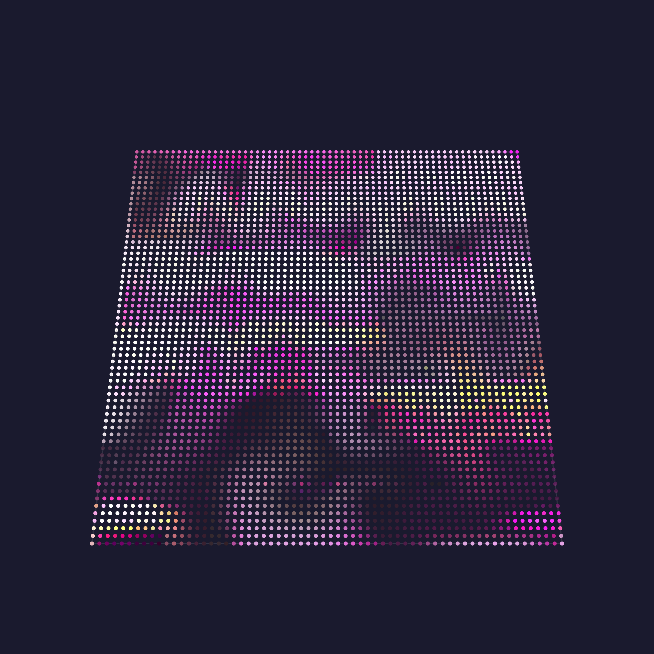
Simulation is the last rung. Jos Stam's Stable Fluids (SIGGRAPH 1999) solves the medium's own motion: diffuse, project, advect, project. Every other flow is a function of position and time; this one is state. A jet fired now changes where everything downstream goes for seconds afterwards.
6. Why 16 bits, in one paragraph
A trail is a value multiplied by slightly less than one, sixty times a second. At 8 bits that does not work: a value of 100 multiplied by 0.994 either truncates back to 99 and keeps falling too fast, or rounds back to 100 and never fades at all. The tail either vanishes or freezes.
So every effect that carries light over time keeps its own plane at 16 bits
and narrows to 8 once, at the end, with dithering. The layer buffer stays 8-bit,
which keeps every driver fast. You get this for free: trail(1) in a script
allocates it, and the blit happens for you.
7. Compiled or scripted
Much of the vocabulary above exists twice: as a C++ kernel, and as a MoonLive builtin. Same algorithm, same numbers. The shapes are worth knowing, though, because they are not identical.
The noise family (noise, fbm, warp), line, circle and the palette calls are the same
function under both names. The transport kernels are reached differently: advect16, decay16,
quantize, blit16, upscale16 and halfLifeKeep are compiled-only, and a script uses them
through six builtins that wrap them, trail(1), flowNoise, flowCurl, trailDecay, emitTrail
and fieldRate. That is deliberate: a script names a wind and a persistence, and the binding owns
the planes, the ping-pong and the narrowing, which is what keeps a whole-plane operation one host
call rather than one per light. Compiled-only for now: disc, sphere, text, sprite, the SDF
catalog and the fluid solver.
MoonLive is projectMM's scripting language. Scripts are compiled to native code on the device, so a script is not interpreted per pixel: it runs at machine speed. You edit one in the browser and the picture changes as you type.
The interesting number is how little a script has to say:
| Effect | MoonLive script | Compiled C++ |
|---|---|---|
| Fluid | 44 lines | 276 lines |
| Trails | 50 lines | 261 lines |
| Aurora | 58 lines | 216 lines |
| Nebula | 63 lines | 271 lines |
These are not stripped-down versions: each is a real effect someone would happily run. The reason they are a fifth of the size is that the heavy lifting is in the kernels, and the kernels are available to both. A script does not implement advection; it calls it. The C++ version is longer mostly because it also handles allocation, resizing and control registration, which the script binding does on the script's behalf.
One honest caveat on that table: fluid.mle is not the Stam solver. The solver has no script
binding yet, so the script pours jets into a curl flow, which LOOKS like a fluid without simulating
one. Aurora, Trails and Nebula are genuinely the same effect in both columns.
This is the point where the two halves reinforce each other. Every kernel added
for a compiled effect immediately makes scripts more capable, and every effect
that turns out to be expressible as a script is one that does not need to be
compiled in at all. fluid.mle is 44 lines:
void tick() {
  flowCurl(zoom, div(force * 4 * span, 64));       // the medium
  trailDecay(40 + persistence * persistence / 12); // the fade

  for (int i = 0; i < jets; i = i + 1) {
    int a = osc(rate, t, 2) + i * 10922;           // where this jet points
    ...
    emitTrail(jx, jy, z, color, 255, radius);      // pour dye in
  }
}
Three kernel calls and a loop. That is a fluid-looking effect.
Which to use. Script first, always: you iterate in seconds instead of minutes,
and a script that fails to compile leaves the previous one running rather than
taking the device down. It is bounded rather than sandboxed, though. A script gets
a fixed member budget and a fixed number of live variables, and the compiler
refuses a script that exceeds them; what it cannot refuse is a per-light loop too
expensive for the fixture, which shows up as a slow frame rate and, on a large
grid, can starve the network stack enough that the web UI stops answering while
the lights keep running. Move to C++ when you need something the vocabulary does
not have, or when the per-light cost is the problem (fieldRate(n) exists
precisely to make a per-light loop affordable on a big fixture).
8. Everything is 3D, when the fixture is
Every kernel on this page takes a depth. On a panel you pass 1 and pay nothing: the loop is the 2D loop exactly. On a cube, the field is sampled along a real third axis, so the slices differ instead of one plane repeating.
Worth knowing where the line currently is: the fields are genuinely volumetric, while transport carries light within each slice and not yet between them. A trail on a cube travels across its slice, not through the volume.
9. Try this
The fastest way to feel it is to break something on purpose. Open a MoonLive script, pick one number, and move it a long way.
| Change | What you should see | The lesson |
|---|---|---|
zoom very low, then very high |
soft blobs, then colored static | scale is everything |
| octaves 1 to 4 | texture appears on the shape, frame time rises | octaves are the cost knob |
warp from 0 upward |
the field stops drifting and starts folding | domain warping |
persistence low to high |
tails from a flicker to seconds long | half-life decay |
Fluid's iterations to 1 (the compiled effect, not the script) |
the flow reads springy | the pressure solve is what makes it a fluid |
10. Making one good: what the failures teach
The kernels above are the easy half. An effect built correctly on them can still be dull, and eight built in one day produced four keepers: the other four were dropped for being unattractive, too sparse, too slow, or for dying out while the music played. What follows is what those four cost, written down so the next effect skips them.
Measure the picture, do not theorize about it
Every wrong diagnosis on this page came from reasoning about code instead of reading a number off the frame. Rendering to a buffer and counting is cheap: what fraction of lights are lit, what the brightest one is, how far the picture moves between frames.
One effect rendered pure black for a day. The cause was a scale mismatch (a wave pressed 15 units deep while the renderer divided slopes by 512, so every ripple came out below the visibility threshold), and no amount of reading the code found it. One measurement did: brightest light 0, in a simulation whose physics was fine. Cheap checks, in order:
| Reads | Means |
|---|---|
| lit fraction near 0 | nothing is reaching the buffer, or everything is below threshold |
| lit fraction near 1 | the effect has no structure, only a wash |
| brightest light far below 255 | a scale mismatch between what is computed and what is displayed |
| frames identical over time | the simulation has converged, or the clock is not advancing |
Pick a quantity that cannot cancel. A center of mass on a symmetric flow stays put while every parcel moves, and reports "nothing is happening" about a working effect.
Match the scales at every seam
Half of the day's bugs were one number expressed in the wrong unit. A control is 0..255, a height field rings to ±20000, a fixed-point position carries 16 fractional bits. Every place two of those meet is a place where a plausible-looking line silently produces nothing, and nothing about it looks wrong on the screen.
Write the conversion where the value crosses, name the constant, and say in a comment what range each side speaks in. When something renders black or blindingly white, suspect a seam before suspecting the algorithm.
A simulation converges: keep feeding it
A fluid driven by forces at fixed positions and fixed angles reaches a steady state and stops. The picture goes still while the music keeps playing, which reads as a crash. This killed one effect outright.
Anything that integrates its own state needs its input to keep changing: rotate where the forces are applied, lean their direction, alternate their sense. Motion in the input is what keeps motion in the output.
Frame-rate independence is not optional
A simulation stepped once per rendered frame runs at whatever speed the hardware happens to deliver. Measured here: 16x faster on a desktop at 1200 fps than on a device at 60. The same effect that reads well on a panel is unusable on a bench.
Accumulate elapsed time and step a fixed amount (16 ms works), capping the catch-up so a stall cannot spend a second of frames at once. Everything that moves goes inside that loop, including trail fades: leaving the fade outside makes trail length depend on frame rate even when the motion does not.
Fill the screen, and keep filling it
Two effects were dropped for the same reason: at rest they showed too little. An effect is judged on the whole panel, so a good one covers it, and covers it in the first second. Sparse output at 6% of lights is a demo, not an effect.
Two habits fix most of it. Give the effect something to do with no input at all, so it is never blank while someone waits for a beat. And start its clocks primed rather than at zero: an effect whose first event is two seconds away reads as broken long before it reads as calm.
Slow is a design property, not a tuning problem
An effect that misses its frame time on the target device is not a slow effect to be optimized later. On the S31 one solver-per-frame effect was both too slow and too dull, which is the common case rather than a coincidence: the expensive part was not the part doing the visual work. Decide what the effect spends its budget on before building it, and measure on the smallest device it claims to support.
Two failed attempts means stop
The rule the project already carries applies hardest here, because a picture always suggests one more plausible tweak. Two attempts that do not fix it mean the diagnosis is wrong, not the parameters. On this page a second "fix" made an effect visibly worse than the bug it targeted.
Pin the behavior, not just the pixels
A golden-hash test passes happily on an all-black frame, which is how an effect shipped rendering nothing while its test stayed green. A hash pins which pixels light; it says nothing about whether any of them do.
Pin the property that would have caught the failure: that the surface is visible, that it still moves after a hundred frames. Then confirm the test fails against the broken code before trusting it, because a test that passes on both is measuring nothing.
Where to go next
- Power functions: the catalog, with what each one costs and who calls it
- Writing scripts: the MoonLive language reference
- Effects: every effect in the tree, with its controls