Devices module
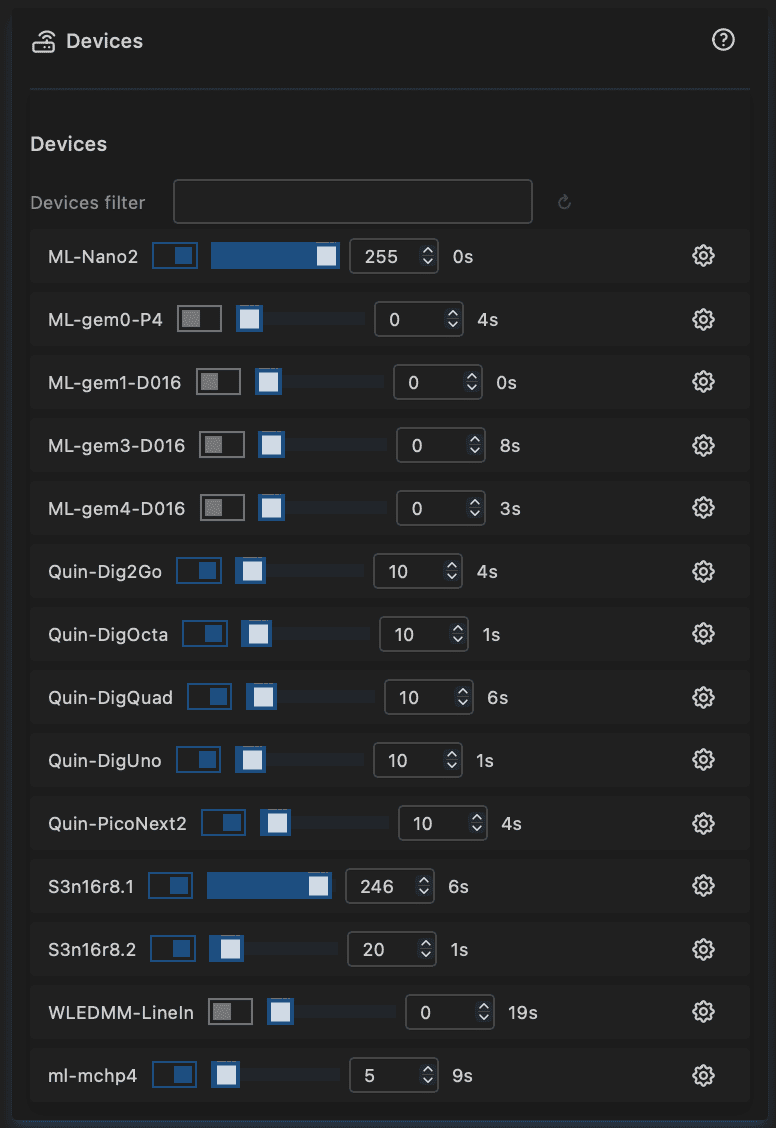
Shows all MoonLight and WLED devices discovered on your local network. MoonLight devices can also be controlled from this view.
Device table columns
- Name — hostname of the device (set in WiFi station)
- Click the name to open the device via mDNS
- Devices with matching hostname prefixes are treated as a group — see Group sync below
- Light controls — mirror the values from the Light controls module; editing them sends the change to that device
- Lights On — turn the device on or off
- Brightness — brightness level
- Palette — active palette
- Preset — selected preset
- Last Sync — how long ago a status update was received (MoonLight devices update every 10 s or immediately on a control change; WLED devices update every 30 s or on a sync)
- IP — click to open the device web UI by IP address
- Version — firmware version (see releases)
- Build — build date of the installed firmware
- Uptime — time since last boot
- Package size — size of the last received UDP packet; useful for diagnosing protocol mismatches
WLED devices show limited information
WLED's discovery packet does not include brightness, palette, or preset — those appear as 0. Name, IP, and lights-on state are available. Full control of WLED devices from this panel is not supported.
Group sync
Devices are automatically grouped by their hostname. Use hyphens to define a group:
| Hostnames | Group |
|---|---|
kitchen-1, kitchen-2, kitchen-3 |
kitchen |
stage-left-1, stage-left-2 |
stage-left |
moonlight (no hyphen) |
no group — stands alone |
The match is at a hyphen boundary: living-room-1 and living-room-2 share the prefix living-room and are in the same group, but living (no hyphen) and livingroom-1 (different spelling) are not in that group.
Set the hostname in WiFi → Station.
How it works:
- Every device broadcasts its status every 10 seconds, and immediately when a control value changes.
- When you edit a light control for a device in the same group as your device, a single broadcast is sent and all group members receive and apply it simultaneously.
- When you edit a device in a different group, a direct message is sent to that specific device, which then re-broadcasts the change to its own group members.
- Updates propagate without looping — a device that receives and applies a group broadcast does not re-broadcast it further.
This means changing brightness on one group member updates all members. You can also reach devices in other groups from any device's table — the change will propagate to their group too.
WLED coexistence
MoonLight and WLED can share the same network without interfering with each other:
- Discovery (port 65506) is shared. MoonLight broadcasts its status in a WLED-compatible format, so both firmware types appear in each other's device lists.
- Control (port 65507) is MoonLight-only. WLED does not listen on this port, so MoonLight control commands never affect WLED devices unintentionally.
Planned features
- Synchronized clocks across devices
- Distributed effects (Part 3)
- Full readback of WLED brightness/palette/preset via the WLED sync port
For developer details on the UDP protocol and packet formats, see develop/devices.
Note: This module's functionality will also be available in ESP32 Devices, a macOS and Windows companion application. 🚧