MoonLight at a Concert
Archived
Originally published 2025-09-09. Migrated without changes. Future home: Community.
Introduction
MoonLight was used to drive all lights on a small festival in early September across 2 stages. See YouTube / MoonModules - FF25. All lights (LED bars, moving heads, rings) were driven by MoonLight v0.5.9. This was the ultimate test to prepare for the v0.6.0 release.
What started as 'we will implement DMX control in a future tool called moonDMX' has evolved into DMX support in MoonLight. Until then, only RGB (3 channels) and RGBW (4 channels) were supported. To support DMX control, channels per light and channel offsets were added. Then setPixelColor became setRGB and new functions setWhite, setPan, setTilt, setGobo etc. were added. This allowed us to define effects that support these functions. 'Classic' effects mainly use setRGB, but effects can also use setPan, setTilt etc. Currently, a few 'move' effects have been defined which can be combined with light effects. For example, combine a classic effect like Noise2D with a move effect like ambient move and it will display beautifully on moving heads, see YouTube video 4:43. Art-Net was used to send DMX data to Art-Net / DMX controllers using XLR cables to control individual lights.
The main difference compared to classic DMX light controller desks is that we currently support only identical types of lights per device, e.g. an array of moving heads or an array of light bars. Each starting DMX address is a multiple of channels per light. For example, a moving head with 32 channels will have start addresses of 1, 33, 65 etc. This is the current compromise between driving LEDs and DMX lights: MoonLight is optimized for large numbers of identical lights in a daisy chain, so driving big LED setups will still be done with the same efficiency as before.
In addition to DMX output, classic direct wiring to ESP32 microcontrollers was also used on the rings display using 16 parallel outputs, enabling the rings to run at 500 FPS.
The effects used in this gig are pretty simple and straightforward, mainly because MoonLight has a limited number of effects (but growing) and DMX support is relatively new. The main goal of using MoonLight here was to test whether MoonLight has the potential for running shows. There were no crashes, no downtime, and no complaints from the audience, so goal accomplished! We learned many lessons (see below), and next time we will do even better!
This post has been written to document the current state of MoonLight, the lessons learned from using it at a show, and the next steps. We also hope this encourages other people to create similar setups using MoonLight.
Hardware used
Both setups
| Product | Image | Shop |
|---|---|---|
| M5Stack AtomS3R | 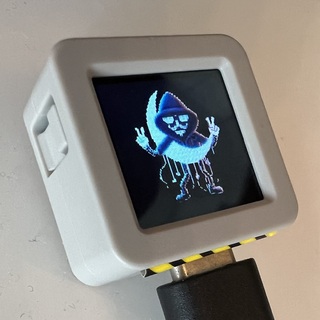 |
Shop |
| Pknight Art-Net DMX 512 | Shop |
Live stage
| Product | Image | Shop |
|---|---|---|
| 18 LED Bars | Shop | |
| GL.iNet GL-AXT1800 router | Shop | |
| WLED-MM Mic sound injector | Tindie shop |
Dance stage
| Product | Image | Shop |
|---|---|---|
| 19x15W Zoom Wash Lights RGBW Beam Moving Head | Shop | |
| GL.iNet AR300M16 router | Shop | |
| WLED-MM Line in sound injector | Link | |
| SE16 | Not for sale yet | |
| 16 x 24 LED Ring | Shop |
Lessons learned
| Lesson | Next step |
|---|---|
| The main challenge for the light bar stage was providing adequate front lighting. This was accomplished by adding a fixed rectangle effect on top of the back light effects. To avoid only colored light, alternating white has been added as a control option to the fixed rectangle effect | add layers in v0.7.0, each layer has a start position and a size |
| Effects on small numbers of lights. Although the Paintbrush effect showed nice patterns, it is not optimized for small displays | need to think of nice patterns for small displays (including moving heads) |
| We want crazy stuff, audience and (some) bands want ambient lighting | allow for both using presets / playlists |
| The shows had to be run as unsupervised as possible. | Preset loops were added with a start and end preset. |
| The tiny M5Stack Atom S3R is up to the task of running MoonLight. When using in Art-Net mode, just connect to USB (power) and go! |
If you like MoonLight, give it a star, fork it or open an issue or pull request. It helps the project grow, improve and get noticed.